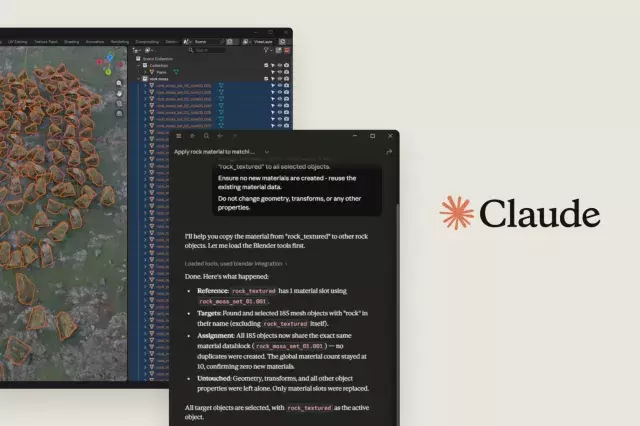
Anthropic has announced that its AI assistant, Claude, can now plug directly into popular creative software like Photoshop, Blender, and Ableton Live. This move is a game-changer for artists, designers, and music producers who want to speed up their workflows. In addition, Anthropic is giving the Blender Foundation a significant cash donation to help keep the 3D software free and open-source.
What Does Claude’s Integration Mean for Creatives?
Claude is an AI chatbot that can understand and generate text, images, and code. By connecting Claude directly to creative tools, users can get real-time help without switching apps. Here are some practical examples:
- In Photoshop: Ask Claude to generate layer masks, suggest color palettes, or write actions for repetitive tasks.
- In Blender: Use Claude to write Python scripts for custom animations, troubleshoot rendering issues, or generate 3D model descriptions.
- In Ableton Live: Get Claude to help with music theory, suggest chord progressions, or automate MIDI effects.
Why This Matters for the Blender Community
Anthropic’s financial support to the Blender Foundation is a big deal. Blender is a powerful, free 3D creation suite used by millions worldwide. The donation will help fund development, server costs, and community projects. This ensures Blender stays accessible to everyone, from hobbyists to Hollywood studios.
How to Get Started with Claude in Your Creative Apps
If you already use Claude, you can enable integrations via the app’s plugin store or by installing a connector. Here’s a quick guide:
- Open your creative software (Photoshop, Blender, or Ableton).
- Go to the plugins or extensions menu.
- Search for “Claude” and install the official connector.
- Sign in with your Anthropic account.
- Start asking questions or giving commands directly in the app.
Tips to Get the Most Out of Claude in Creative Workflows
To maximize productivity, try these tips:
- Be specific: Instead of “help me with this design,” say “create a layer mask for the background in this photo.”
- Use examples: Show Claude a reference image or describe the style you want.
- Iterate quickly: Claude can generate multiple options in seconds, so experiment with different prompts.
Will This Replace Human Creativity?
No. Claude is a tool, not a replacement. It handles repetitive tasks, suggests ideas, and speeds up workflows. But the creative vision, taste, and final decisions still come from you. Think of Claude as a super-powered assistant that handles the boring stuff so you can focus on the fun parts.
What’s Next for Claude and Creative Software?
Anthropic is likely to add more integrations in the future. Expect support for video editing tools like Premiere Pro, audio DAWs like Logic Pro, and design platforms like Figma. The goal is to make AI a seamless part of the creative process.
If you’re a creative professional, now is a great time to test Claude with your favorite tools. Start small, experiment, and see how much time you can save.











Comment