
Apple Redesigns Screen Time and Overhauls Child Controls: What Parents Need to Know
-
2 minutes, 10 seconds
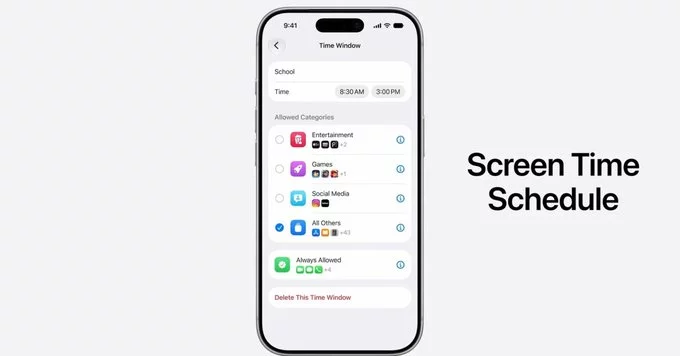
Apple is redesigning Screen Time and overhauling child controls to give parents more powerful and easier ways to manage their kids' device use. This major update aims to address common frustrations with the current system, making it simpler to set limits, monitor activity, and protect children online.
What Is Changing with Screen Time?
The new Screen Time will offer a cleaner, more intuitive interface. Instead of digging through complex menus, parents will find clear options to manage daily screen limits, app categories, and downtime schedules.
Key Improvements Include:
- Simplified setup: A step-by-step guide helps parents configure controls for each child in minutes.
- Better app categories: Apps are grouped logically (e.g., social media, games, education) so you can set limits by type, not just individual apps.
- Real-time alerts: Parents receive notifications when a child requests more time or tries to access a blocked app.
- Enhanced downtime: You can now schedule different downtime hours for weekdays and weekends.
Overhauled Child Controls: More Power for Parents
Apple is also revamping child controls beyond Screen Time. The new system puts parents in charge of communication, purchases, and privacy settings right from their own device.
What Parents Can Now Control:
- Communication limits: Decide who your child can call, message, or FaceTime during school hours or at bedtime.
- Purchase approvals: Get instant requests for app downloads or in-app purchases, with the option to approve or deny from your phone.
- Privacy settings: Manage location sharing, app permissions, and advertising tracking for each child.
- Content restrictions: Block explicit music, movies, websites, and even specific words in searches.
Why This Matters for Families
Many parents struggle to balance screen time with healthy habits. Apple's redesign makes it easier to enforce rules without constant arguments. For example, you can set a 30-minute daily limit for social media apps, and the system will automatically lock them when time is up.
Pro tip: Use the new downtime feature to create tech-free zones, like during dinner or homework. The system will gray out non-essential apps, encouraging focus on real-world activities.
When Will These Changes Arrive?
Apple plans to roll out the updated Screen Time and child controls with the next major software update (likely iOS 18). Users can expect a beta version for testing in summer 2025, with a public release in fall 2025.
Apple's redesign of Screen Time and overhaul of child controls is a welcome step for parents seeking better digital parenting tools. By simplifying the experience and adding more granular controls, Apple is helping families build healthier relationships with technology. Stay tuned for the official release to take full advantage of these new features.



Contact Information





Suggested Writers
-

2.5K articles
-

1.3K articles
-

34 articles
-

28 articles



Comment