Alerts

-
3 minutes, 26 seconds
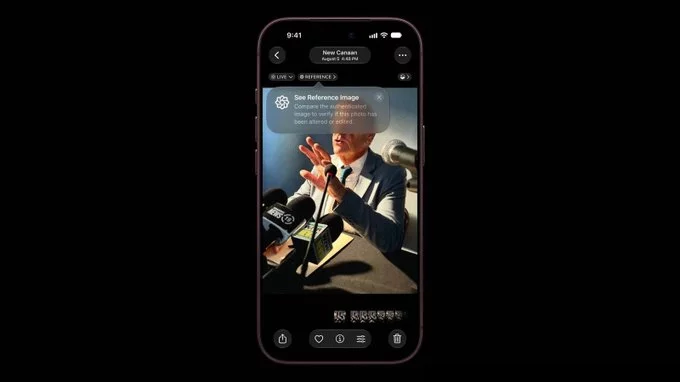
Apple's reference image method offers a way to confirm that a photograph is genuine rather than generated or manipulated. The approach relies on comparing a photo against a trusted original, known as a reference image, to verify its authenticity.
According to Apple's explanation, this method gives users a dependable means of checking whether an image is real. By anchoring verification to a known reference, the technique helps distinguish authentic photos from synthetic or altered ones.
This matters because convincing fake images are increasingly easy to produce. Apple's reference image approach addresses that problem directly, providing a practical test users can apply when the origin of a photo is in question.
For Apple users, the method reflects the company's broader emphasis on privacy and trust in its ecosystem. Rather than asking people to judge authenticity by eye alone, the reference image method supplies a concrete standard for confirming that a photo is what it claims to be.
Not every photo on a phone is a faithful record of reality. Screenshots, downloaded images, AI-generated pictures, and edited files all sit in the same library as genuine captures, and at a glance they can be impossible to tell apart. That ambiguity is exactly what Apple's reference image approach is designed to resolve.
The purpose is straightforward: give a photo a verifiable link to the moment it was taken. Rather than relying on metadata alone, which can be copied or altered, Apple's method uses a reference image as a basis for comparison, so a picture can be checked against something that originates from the capture itself.
This matters because the value of a photograph often depends on trust. Whether it is evidence, a news image, or a personal memory, users need a way to confirm that what they are looking at is real. By anchoring authenticity in a reference image, Apple aims to make that confirmation possible without asking users to take the file on faith.
Apple's approach relies on a simple idea: capture more than one image of the same scene, then let the system check whether they match. When you take a photo in a supported mode, the iPhone also records a reference image alongside it. That reference image acts as a baseline for the scene you photographed.
Later, when the authenticity of the photo is questioned, the system compares the two. Apple's details explain that the reference image is used to prove a photo is real by confirming that the captured image corresponds to the same scene the device actually recorded. Because the reference image is generated by the camera itself at the moment of capture, it is far harder to fabricate than an edited file alone.
The method does not ask users to do anything special. It works quietly in the background, and the verification happens through the relationship between the photo and its reference image rather than through any manual inspection.
For everyday iPhone owners, Apple's reference image method changes how much weight a photo can carry as evidence. A picture captured through this system is no longer just an image file; it arrives with a verifiable link back to the moment of capture. That matters in disputes over property damage, deliveries, or anything else where someone might otherwise question whether a photo was edited or generated.
The practical upside is trust without extra effort. You do not need to run the photo through third-party software or keep separate records. The verification travels with the image itself, so sharing it with an insurer, a landlord, or a court does not strip away its credibility.
There are limits worth keeping in mind. The method proves a photo came from a real capture, not that it tells the whole story. Framing, timing, and context still shape what any image shows. Users should treat verification as one strong signal among several, not as a substitute for judgment about what a photo actually depicts.










Comment