Alerts

-
4 minutes, 3 seconds
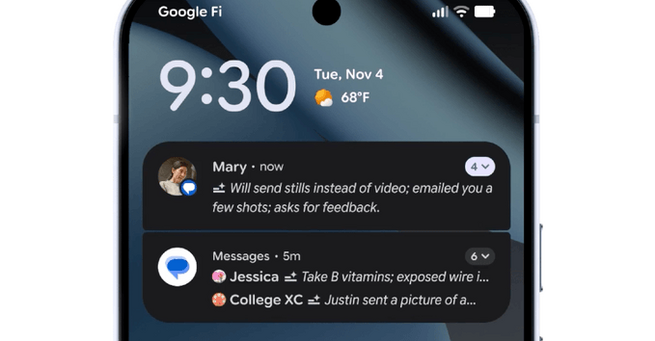
Android users are getting a smarter way to manage messages. Google is expanding its AI-powered notification summaries to more devices, moving beyond the initial rollout on Pixel phones. The feature condenses long texts and group chats into quick, readable snippets, letting users catch up without scrolling endlessly. While iOS has similar tools, Google is keeping this AI focused strictly on chat apps for now, offering a more targeted experience.
The AI notification summaries automatically shorten lengthy messages and group conversations into digestible previews. This means you can quickly scan important conversations without opening each chat. Google emphasizes that these summaries are designed to maintain context, so you don’t miss critical details while saving time. Users can now get the gist of multiple conversations in a glance, making busy messaging threads far less overwhelming.
Alongside AI summaries, Google is introducing a notification organizer in Android 16. It automatically groups and silences “lower-priority” notifications, including social media alerts, promotions, and news. This reduces clutter on your lock screen and ensures that only essential notifications demand your attention. The tool aims to make notifications less intrusive while giving users more control over their digital environment.
Android 16 also brings new personalization options. Users can now customize home screen icon shapes and themes, allowing for a more personal look and feel. Expanded dark mode automatically darkens apps that don’t natively support it, providing a more consistent visual experience. These updates not only enhance aesthetics but also reduce eye strain during extended phone use.
Parents gain a major convenience with the consolidation of Android parental controls. All tools for screen time, app management, and downtime scheduling are now centralized in the Android Settings menu. This makes it easier for families to enforce digital boundaries and maintain healthy usage habits across devices.
Google is also expanding accessibility tools. Expressive Captions, which capture the intensity of real-time speech, is now available for all YouTube videos in English uploaded after October. This helps users who rely on captions better understand tone and context, enhancing inclusivity across Google services.
Other notable updates include a Circle to Search tool to spot scams and an improved Phone by Google app. The app now allows urgent call alerts for family or friends, provided both parties are on Android with the Phone app set as default. These changes aim to make Android devices safer and more connected, especially in critical situations.
With AI notification summaries and Android 16 updates, Google is doubling down on efficiency, personalization, and safety. Users can now manage messages faster, reduce distractions, and customize their phones like never before. This rollout highlights Google’s focus on smarter, user-friendly AI integration without overstepping into unnecessary areas like news summaries.










Comment