Alerts

-
2 minutes, 18 seconds
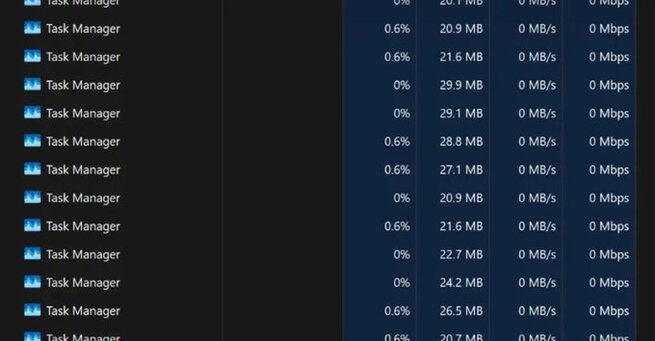
A bizarre Windows 11 bug duplicates Task Manager instead of closing it, leaving users frustrated after the latest October 2025 update. The issue appears when users click the “X” to close Task Manager—rather than quitting, it creates extra copies running in the background. This glitch not only clutters the system but also drains CPU and RAM, leading to slower performance.
According to Microsoft, the optional KB5067036 update triggers this glitch. The bug prevents Task Manager from shutting down correctly, spawning multiple taskmgr.exe processes instead. Microsoft confirmed the issue on its official support page, noting that these instances “consume system resources and may degrade performance.” The company is actively working on a permanent fix.
Until Microsoft releases an official patch, users can try temporary workarounds. Instead of clicking the “X” button, select the “End task” button within Task Manager to close it properly. Alternatively, open Command Prompt and type:
This command force-closes all open Task Manager instances instantly. Both Microsoft and Windows users recommend these steps to prevent further system lag.
If you rely heavily on Task Manager, experts suggest holding off on this optional update until Microsoft resolves the problem. While it’s not a security update, its duplication bug can disrupt system performance and productivity. Microsoft has promised to release more details soon, so staying tuned for the next patch is your best move.










Comment