
Alerts
-
2 minutes, 21 seconds
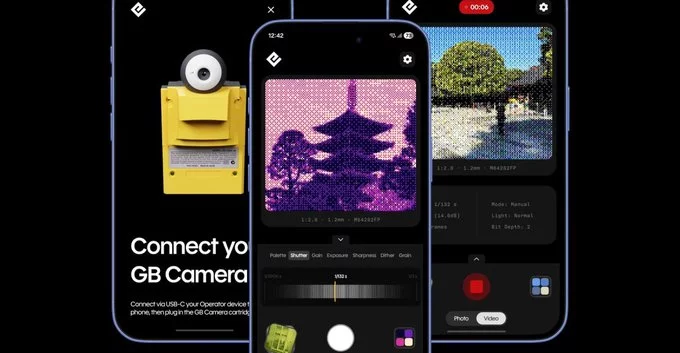
You can now use the Game Boy Camera with your phone, thanks to new adapters and software. This lets you capture classic 8-bit pixel art photos and share them instantly on social media. No need for old hardware or complicated setups—just a simple connection and a free app.
The Game Boy Camera was a 1998 accessory for Nintendo's handheld console. It took grainy, black-and-white images with a resolution of 128x112 pixels. Despite its limits, it became a cult favorite for its retro charm and creative filters.
You need three things: a Game Boy Camera cartridge, a Game Boy (or compatible handheld), and a special adapter. Here’s a step-by-step guide:
Buy a Game Boy Camera to USB-C or Lightning adapter. These are available online from retro gaming stores or marketplaces like eBay. Make sure it matches your phone’s port.
Download a compatible app, such as Game Boy Camera Manager (iOS) or GB Camera Tool (Android). These apps let you view, save, and edit photos from the camera.
Plug the adapter into your phone, then insert the Game Boy Camera cartridge. Open the app, and it will detect the camera. You can now browse photos on the cartridge and save them to your phone’s gallery.
Get the most out of your retro setup with these simple tips:
Once you’ve saved images to your phone, try these ideas:
You can buy the original camera and adapters from:
With the right tools, you can bring the Game Boy Camera into the modern world. It’s a fun, low-cost way to add retro flair to your phone photography.






Comment