
Trending
Trending Hashtags
Alerts
-
3 minutes, 2 seconds
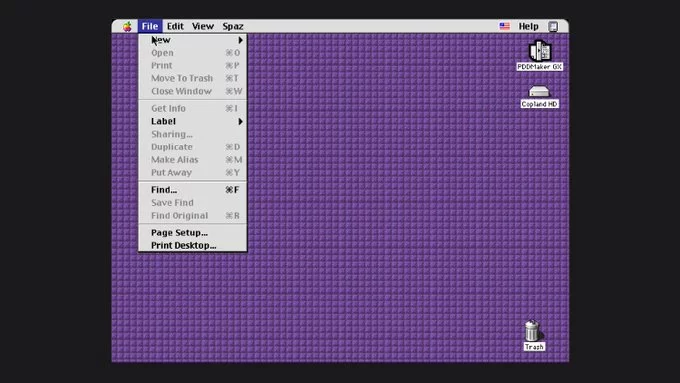
Copland was Apple's unreleased operating system project, intended as a successor to Mac OS. Development began in 1994, and the project was formally cancelled in 1996. It was also known as System 8.
Copland was designed to deliver the modern features Mac OS lacked, including preemptive multitasking, protected memory, and a new graphical interface. Apple hoped it would modernise the platform without breaking compatibility with existing Mac software.
That goal proved difficult. The project grew complex and unstable, and Apple struggled to ship it. By 1996, Copland was cancelled. Apple instead acquired NeXT, and NeXT's operating system became the foundation of Mac OS X.
Because Copland never shipped, it is often remembered as one of Apple's most famous cancelled projects. It also marked a turning point: the failure of Copland led directly to the acquisition and technology that define the Mac today.
You can now try Copland in your browser, making it accessible without special hardware. Whether you're curious about Apple's abandoned operating system or want to experience a piece of computing history firsthand, the barrier to entry is lower than ever.
To try Copland in your browser, simply visit the emulator page and let it load. No downloads or installations are required. The emulator runs directly in your web browser, so you can explore the system on virtually any modern device.
Once loaded, you can interact with the Copland environment just as you would with the original system. This browser-based approach removes the technical hurdles that once made trying Copland difficult, opening it up to anyone with a passing interest in Apple's history.
Once Copland boots in your browser, you are dropped onto a familiar desktop. The interface follows the classic Mac pattern: a menu bar across the top, a desktop for icons, and draggable windows you can open, move, and close. Because the emulator runs a real copy of the operating system, every click responds the way it would on period hardware.
Several built-in applications are ready to launch from the Apple menu or by double-clicking items on the desktop:
You can resize windows, switch between open applications, and drag files around just as the original users did. The whole environment is interactive rather than a static screenshot, so it rewards curiosity: open a menu, poke around a control panel, and see how the unfinished system behaves.
Copland occupies a fascinating, if unfinished, place in Apple's history. It was the company's ambitious attempt to build a modern operating system from the ground up, and its story offers real insight into Apple's development efforts during a turbulent era. Rather than being a minor side project, Copland was central to Apple's plans for the future of the Mac.
Its importance goes beyond nostalgia. Studying Copland helps explain the technical and strategic challenges Apple faced, and why the project ultimately gave way to a different direction. For enthusiasts and historians alike, it is a window into the decisions that shaped the platform.
Thanks to emulation, that history is no longer locked away. You can now try Copland in your browser and experience a piece of Apple's past firsthand. That accessibility is what makes Copland matter today: it turns an abandoned project into something you can actually explore, rather than just read about.










Comment