Alerts

-
3 minutes, 18 seconds
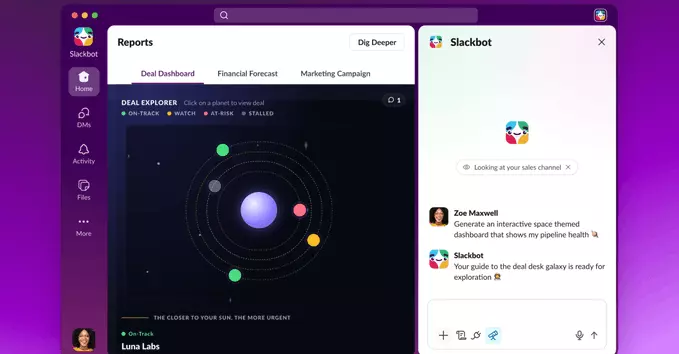
Building a custom tool for your team used to mean filing a request, waiting on engineering, or wrestling with an internal app builder. Slackbot now removes most of that friction: you can describe the tool you want in plain language, and Slackbot will build it for you.
The announcement marks a shift in how Slackbot is positioned. Rather than acting only as a helper that answers questions or surfaces information, it can now generate working tools from a written description. You explain what the tool should do, and Slackbot handles the construction.
That means the starting point is no longer code or configuration screens. It is a sentence describing the job to be done. For teams that have long kept a backlog of small internal utilities, the barrier between "we could use a tool for this" and actually having one is now considerably lower.
The result is a more direct path from idea to working tool, with the description itself serving as the build instruction.
The description-to-tool process is designed to be conversational and quick. Instead of configuring anything manually, you simply tell Slackbot what you want in plain language. Based on that description, Slackbot builds the tool for you.
The workflow follows a simple pattern:
The key idea is that the description itself is the starting point. There is no separate build step you have to manage, and no technical specification you need to write. You describe the tool, and Slackbot handles the creation from that description.
This keeps the barrier to entry low. If you can explain what you need, you can set the process in motion and let Slackbot turn that explanation into a working tool.
The change lets Slack users get a tool built for them without building it themselves. Instead of learning to code, wrestling with APIs or filing a request with IT, you describe what you need in plain language and Slackbot turns that description into a working tool.
The practical effect is that the gap between having a problem and having a solution shrinks dramatically. A workflow that once required a developer, a ticket or a third-party app can now be created by the person who actually understands the task. That puts the power to shape your own workspace in your hands.
It also means fewer compromises. Rather than adapting your process to whatever off-the-shelf tool happens to exist, you can ask for exactly what fits how your team works. The tool is built for you, not for a generic user.
For everyday Slack users, the barrier to creating something useful is now a description rather than a development project.
This capability is available in Slack, so there is nothing new to install or configure before you try it. The starting point is Slackbot itself: users can begin by asking Slackbot to build a tool. From there, the description you provide becomes the basis for the tool Slackbot creates.
If you already use Slack day to day, getting started requires no separate setup or unfamiliar interface. You simply open a conversation with Slackbot and make your request in plain language, describing the tool you want. Slackbot handles the rest of the description-to-tool process from that request.
Because the feature lives inside Slack, it fits naturally into existing workflows rather than pulling users into another application. Teams that want to test it can do so immediately, without waiting on an rollout or a new integration. The only prerequisite is access to Slack and the willingness to describe, in your own words, what you would like Slackbot to build for you.










Comment