Profile
Xiaomi is the latest smartphone maker to add AirDrop support with Quick Share to its Android phones. This means Xiaomi users can now quickly and wir...
Xiaomi Adds AirDrop-Like Quick Share Support to Its Android Phones
Jun 2 -
2 minutes, 45 seconds
Xiaomi Joins the Quick Share Ecosystem
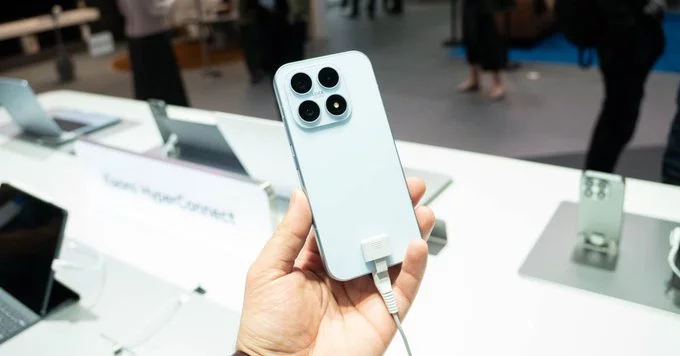
Xiaomi is the latest smartphone maker to add AirDrop support with Quick Share to its Android phones. This means Xiaomi users can now quickly and wirelessly share files, photos, and documents with other devices that support Quick Share. The feature works like Apple's AirDrop but is built for Android and Windows devices.
What Is Quick Share?
Quick Share is a file transfer tool developed by Google and Samsung. It lets you send files between Android phones, tablets, and even Windows PCs without needing cables or internet. It uses Bluetooth and Wi-Fi to find nearby devices and send data fast. Think of it as AirDrop for Android.
Why This Matters for Xiaomi Users
If you own a Xiaomi phone, this update is a big deal. Here is why:
- Easy file sharing: Send photos, videos, and apps to friends with Samsung, Google Pixel, or other Android phones.
- No extra apps needed: Quick Share is built into the system, so you do not have to install third-party tools.
- Works with Windows: You can also share files to a Windows laptop or PC with Quick Share installed.
- Fast and secure: Transfers are encrypted and happen over a direct connection.
How to Use Quick Share on Xiaomi Phones
Using Quick Share on your Xiaomi device is simple. Follow these steps:
- Open the file you want to share (like a photo or document).
- Tap the Share button.
- Select Quick Share from the list of options.
- Your phone will scan for nearby devices. Tap the device you want to send to.
- The other person must accept the transfer on their device.
That is it! Your file will send in seconds.
Which Xiaomi Phones Support Quick Share?
Quick Share is rolling out to Xiaomi phones running MIUI 14 or later. Most recent models like the Xiaomi 13 series, Xiaomi 12 series, and Redmi Note 12 series should get the update. If you have an older phone, check your settings for a system update.
Quick Share vs. Other File Sharing Methods
There are many ways to share files on Android. Here is how Quick Share compares:
- Bluetooth: Slower and less reliable for large files.
- Email or messaging apps: Need internet and have file size limits.
- Nearby Share (Google): Quick Share is actually based on Nearby Share. Xiaomi is just making it easier to use.
- Apple AirDrop: Only works between Apple devices. Quick Share works across Android and Windows.
Tips for Best Results
To get the most out of Quick Share on your Xiaomi phone:
- Keep Bluetooth and Wi-Fi turned on.
- Make sure both devices are close together (within 30 feet).
- Update your phone to the latest software version.
- If a transfer fails, try turning off mobile data or restarting the connection.
What This Means for Android Users
Xiaomi adding Quick Share support is a win for the Android ecosystem. It means more devices can talk to each other seamlessly. If you have friends with Samsung or Google phones, you can now share files without hassle. This move also puts pressure on Apple to make AirDrop cross-platform in the future.
Xiaomi embracing Quick Share is a smart step. It improves the user experience and makes file sharing as easy as AirDrop. If you have a Xiaomi phone, try it out today. You will wonder how you lived without it.
Related Posts
Photos
Contact Information
Suggested Writers
-
2.4K articles
-
1.3K articles
-
34 articles
-
28 articles


Comment