Alerts

-
5 minutes, 52 seconds
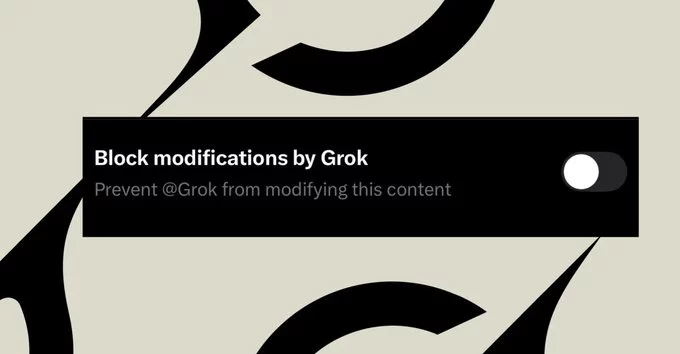
Social media users asking “Can people stop AI from editing my photos on X?” now have a partial answer. X Grok photo edit block is a new toggle designed to limit how the Grok chatbot can modify images uploaded to the platform. The feature aims to reduce misuse after widespread criticism of AI-generated edits.
However, the new control does not completely stop image manipulation. Instead, it blocks one specific method of triggering Grok to alter photos. That limitation has already sparked debate about whether the feature truly protects users.
Understanding what the toggle actually does—and what it does not do—is essential for anyone posting images on X.
The update follows intense scrutiny around the AI chatbot Grok, which can generate or modify images through user prompts. Some users discovered that simply tagging the bot alongside an image allowed them to request edits.
This capability quickly became controversial when people began experimenting with altered photos of real individuals. Critics argued the system created serious privacy and safety risks, particularly when AI edits were applied to pictures of everyday users.
The company behind Grok, xAI, faced mounting pressure to introduce safeguards. The new toggle represents one of the first visible attempts to respond to those concerns.
Still, many observers say the change feels more like a partial fix than a full solution.
The Grok photo edit block is hidden within the image upload tools on X.
When uploading a photo in the mobile app, users can open the image editor and access a settings option that allows them to block modifications by Grok. Once activated, the platform prevents other users from tagging the chatbot directly with editing instructions.
That means someone cannot simply reply to your post and summon the bot to modify the image through a tagged command.
However, the feature only affects that specific tagging mechanism. If the image is saved, reposted, or used elsewhere, Grok or other tools may still be able to edit it.
This limitation has become the central criticism of the update.
Despite the name, the feature does not fully prevent AI edits. Instead, it blocks only the ability to trigger Grok through tagging within replies.
Several key restrictions stand out:
The toggle only blocks tagging @Grok on the image post.
It does not stop edits made outside the original post.
The feature is only available when uploading new images.
Older photos already on the platform cannot be retroactively protected.
These gaps mean determined users can still manipulate images if they access them in other ways.
For privacy advocates, that makes the protection feel incomplete.
Concerns about AI image editing have grown rapidly as generative tools become easier to use. When users can alter real photos with simple prompts, the risk of misleading or harmful content increases.
Experts say stronger safeguards are needed to protect individuals, especially when AI systems can generate convincing visual edits.
The Grok photo edit block may reduce casual misuse, but critics argue it does not address the underlying issue: once an image is public online, AI tools can potentially alter it anywhere.
Because of this, some observers describe the feature as more of a speed bump than a real barrier.
Anyone sharing images on X should understand that the Grok toggle is only a limited control. While it prevents direct tagging requests to the chatbot, it does not guarantee that images cannot be edited elsewhere.
Users concerned about AI manipulation may want to consider broader precautions. These could include limiting public sharing of personal images or using watermarking techniques.
The introduction of the Grok photo edit block signals that the platform recognizes growing worries around AI-generated edits. Yet the debate shows that social networks are still struggling to balance innovation with safety.
For now, the feature offers a small layer of protection—but many users believe stronger tools are still needed as AI editing capabilities continue to evolve.










Comment