
-
3 minutes, 17 seconds
Windows 11 Run Dialog Gets a Sleek New Look
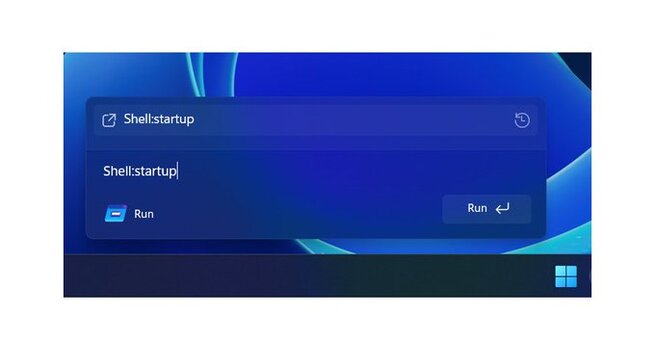
Microsoft is finally giving the Run dialog in Windows a long-overdue visual refresh. For over 30 years, the Run prompt has remained largely unchanged, but the latest Windows 11 preview builds show a modernized design that blends seamlessly with the operating system’s aesthetics. Early testers are noticing a launcher-style interface, while the familiar functionality remains untouched.
A Design That Matches Windows 11
The updated Run dialog feels less like a legacy tool and more like a polished Windows 11 feature. It now supports dark mode and rounded corners, aligning with Microsoft’s push for a cohesive design language across apps. Despite the cosmetic changes, power users will find all the same commands still work, making it a functional yet visually upgraded tool.
Run Dialog: A Windows Staple
Since its introduction in Windows 95, the Run prompt has been a favorite for launching apps quickly. Users can type shortcuts like “mspaint” for Paint, “calc” for Calculator, or “dxdiag” for the DirectX Diagnostic Tool. This small utility has remained a hidden gem for advanced users who prefer keyboard shortcuts over navigating menus.
Modern Launcher-Like Interface
The most striking change in the new Run dialog is its launcher-like appearance. It no longer feels like a boxy, outdated feature tucked away in Windows. Rounded edges, subtle shadows, and improved font styling make the prompt feel fresh and integrated into the overall Windows 11 environment.
Preview Users Spot the Changes
The updated design was first noticed by X user Phantomofearth, who shared screenshots from the latest Windows 11 Insider builds. Microsoft has yet to confirm a wide rollout, but these early previews suggest the company is moving steadily toward modernizing even its oldest tools.
Why This Matters to Users
For long-time Windows users, the refreshed Run dialog is a welcome update. While it doesn’t add new functionality, the visual overhaul shows Microsoft is committed to modernizing legacy components. It also signals that even small utilities in Windows 11 will now match the overall system’s aesthetic and accessibility improvements.
Looking Ahead
With Windows 11 steadily evolving, the updated Run dialog is just one example of how Microsoft is updating its core tools for a modern audience. Expect more classic features to receive similar aesthetic and usability enhancements in future builds, making the OS feel more cohesive and user-friendly.

2.6K articles

1.4K articles

34 articles

28 articles












Comment