Alerts

-
3 minutes, 43 seconds
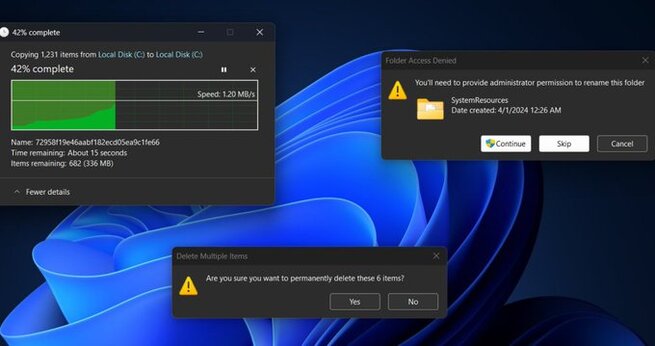
Dark mode has become one of the most requested features across devices, and Windows 11 is finally stepping up with significant improvements. While Microsoft first introduced dark mode in Windows 10, it always felt unfinished, with parts of the system still showing mismatched light elements. Now, Windows 11 dark mode is evolving to deliver a more polished, consistent, and user-friendly experience. In the latest preview build, users can see deeper refinements that make the interface smoother, more comfortable, and visually cohesive—something fans have been waiting nearly a decade to enjoy.
The importance of dark mode goes far beyond aesthetics. For many users, Windows 11 dark mode reduces eye strain, especially when working late into the night or in dimly lit environments. A consistent dark theme also helps create a more professional and distraction-free workspace. Until now, however, one of the biggest frustrations with Windows dark mode has been its inconsistency—file dialogs, system prompts, and certain apps often broke the immersion by reverting to light mode. The new update tackles these issues, ensuring that everything from copy-paste dialogs to system-level prompts finally embraces the darker aesthetic. This improvement brings Windows 11 in line with modern design expectations while enhancing user comfort.
The latest preview builds show that Windows 11 dark mode is expanding across more parts of the operating system. File operation dialogs, such as copying, moving, or deleting files, are now rendered in dark mode, fixing one of the most noticeable inconsistencies from the past. While some buttons are still transitioning to fully match the darker theme, this update clearly shows that Microsoft is committed to refining the experience. These changes might look subtle at first glance, but for daily users who rely heavily on multitasking and file management, they bring much-needed visual harmony. It’s a sign that dark mode is no longer an afterthought but an integral part of Windows design.
With Windows 11 dark mode becoming more consistent, the focus now shifts to what’s next. Microsoft’s efforts suggest that future updates will likely expand dark mode support to even more system components and built-in applications. This aligns with user expectations in 2025, where nearly every modern app offers a seamless dark theme. A more refined Windows 11 dark mode also positions the operating system as more competitive and user-friendly, appealing to both casual users and professionals who value comfort, accessibility, and design. If Microsoft continues this momentum, dark mode could evolve into a defining feature of Windows 11—one that finally feels complete after years of feedback.










Comment