
Alerts
-
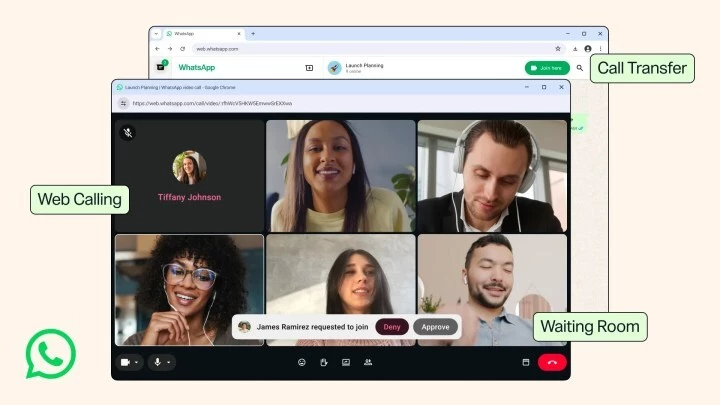
After years of limiting calls to mobile and native desktop apps, Meta has officially launched audio and video calling on WhatsApp Web. This long-awaited update allows users to make and receive calls directly from any browser, offering the same core functionality as the smartphone experience.
On the web interface, a dedicated Calls tab displays your call history and favorites, mirroring the structure found on mobile and desktop apps. Users can also access popular features like screen sharing and reactions during calls, making the web app a viable option for work meetings and casual conversations alike.
Alongside web calling, Meta introduced several upgrades designed to improve call management and privacy. These features are rolling out globally and will enhance how you handle group and one-on-one calls.
One standout addition is the ability to transfer a call from one device to another without hanging up. For example, if you start a call on the desktop or web app, you can seamlessly switch to your phone and continue the conversation. This flexibility is ideal for users who move between devices during a call.
Group call hosts can now enable a waiting room by selecting the “Require approval to join” option when creating a call link. This allows you to admit participants one by one or remove unwanted attendees. It’s a critical update for professional use, ensuring that only authorized people join sensitive discussions.
Meta is also improving call quality with two practical features: background noise suppression and high-definition video at the start of calls.
WhatsApp recently opened reservations for usernames. Once the feature is live, users will be able to call each other using their username instead of a phone number, adding another layer of privacy and convenience across platforms.
To access the new web calling features, simply open WhatsApp Web in your browser and scan the QR code with your phone. Ensure your app is updated to the latest version. The Calls tab will appear automatically, and you can start making audio or video calls with any contact.
These updates mark a significant step in making WhatsApp a more versatile communication tool, especially for users who rely on browser-based workflows. Keep an eye out for additional improvements like username calling in the coming weeks.










Comment