
Alerts
-
2 minutes, 43 seconds
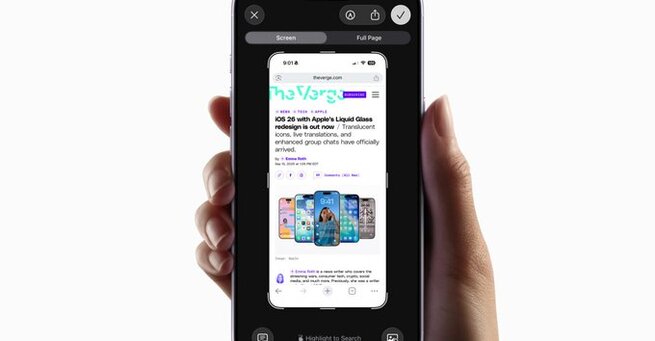
Apple’s iOS 26 update quietly changed how screenshots behave—and not everyone is a fan. Instead of shrinking into a neat thumbnail in the corner, screenshots now pop up in a full-screen preview. The change feels intrusive for many users, but here’s the good news: you can turn off iOS 26’s obtrusive new screenshot previews with just a quick settings tweak.
For years, iPhone users were used to a small floating thumbnail after capturing a screenshot. It was quick, minimal, and easy to ignore if you didn’t need editing tools. With iOS 26, Apple introduced full-screen previews that dominate your display the moment you snap a screenshot.
While the update gives faster access to editing features, it can also feel jarring—especially if you take multiple screenshots in a row or want to keep your workflow distraction-free.
Thankfully, Apple included a simple way to bring back the old thumbnail behavior. Here’s how:
Open the Settings app on your iPhone.
Go to General > Screen Capture.
Toggle off Full-Screen Previews at the top.
Once disabled, screenshots will once again appear as a small thumbnail in the lower-left corner, instead of covering your whole screen.
This option is a perfect example of Apple listening to user preferences. Some people love the immediacy of full-screen previews, while others prefer a minimal, distraction-free approach. By giving control back to users, iOS 26 makes it easy to choose the screenshot workflow that fits best.
If you’ve been frustrated by the sudden change, rest easy—you can turn off iOS 26’s obtrusive new screenshot previews in seconds. It’s a small tweak, but it goes a long way toward making your iPhone experience feel familiar and less cluttered.









Comment