Alerts

-
3 minutes, 31 seconds
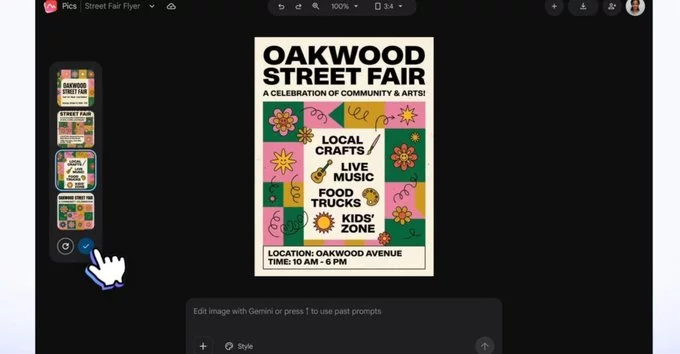
Imagine a world where creating stunning visuals for presentations, documents, or even social posts doesn’t require switching between a dozen different tools. That world is arriving with the launch of a new image generation and editing app designed specifically for Google Workspace. This innovative application brings robust graphic design capabilities directly into the productivity suite you already use daily, eliminating the friction of exporting files and juggling separate subscriptions.
At its core, the app empowers users to generate original images from simple text prompts and then refine them with intuitive editing tools, all without leaving the Google ecosystem. Whether you’re a marketer crafting a campaign visual or a teacher making a lesson plan more engaging, the goal is to make professional-grade design accessible to everyone. The app isn't just about adding filters; it’s about fundamentally changing how we approach visual content creation within our workflow. By integrating directly into Workspace, it streamlines the creative process, allowing you to move from idea to polished graphic in a matter of minutes. This introduction marks a significant step toward a more unified, creative, and efficient digital workspace.
The new image app is built directly into the Google Workspace ecosystem, meaning you no longer need to switch between tabs to enhance your visual content. Its deep integration with Google Docs and Google Slides allows you to generate and edit images without ever leaving your document or presentation.
From the moment you open a Doc or Slide, you can access the app’s tools via a dedicated sidebar. This proximity eliminates the friction of exporting files or copying images between applications. For instance, when you need a custom illustration for a report, you can describe it in a prompt and the app will generate several options right in your document. You can then make adjustments, crop, or apply filters directly to the image, all while your text and layout remain untouched.
This seamless workflow is designed to keep your creative momentum going. Whether you are drafting a proposal or building a pitch deck, the integration ensures that your visuals are finalized in context, saving you significant time and effort.
At the heart of the app lies its robust text-to-image generation, which allows users to describe a concept in plain language and receive a polished visual in seconds. This feature leverages advanced AI to interpret prompts accurately, making it ideal for creating custom illustrations or concept art without manual drawing skills.
Beyond generation, the app includes a comprehensive set of image editing tools. Users can adjust colors, remove backgrounds, and apply filters directly within the interface. These tools are designed to simplify graphic design by consolidating common tasks into a single workflow, eliminating the need to switch between multiple software programs.
For those new to design, the app offers guided presets and smart suggestions that automate layout adjustments. This reduces the learning curve, enabling users to produce professional-looking graphics for presentations or social media with minimal effort. By combining creation and refinement in one place, the app streamlines the entire visual production process.
The new image app is available today for all Google Workspace customers, including Business, Enterprise, and Education editions. It is also accessible to individual users with a free Google account, ensuring broad reach across professional and personal workflows.
By embedding directly within Docs, Sheets, and Slides, the app significantly reduces context switching. Users no longer need to leave their document to open a separate design tool, which can save valuable time and maintain creative momentum. This integration empowers users to generate professional-quality visuals—such as charts, diagrams, and branded graphics—without requiring advanced design skills.
The impact on productivity is tangible: teams can iterate on visual assets in real time during collaborative sessions. For project managers, marketers, and educators, this means faster turnaround on reports and presentations. The app also supports version history, so all edits are tracked within the familiar Workspace environment.
Ultimately, this tool democratizes visual creation, placing professional capabilities directly in the hands of everyday users, right where their work already happens.










Comment