
Alerts
-
3 minutes, 22 seconds
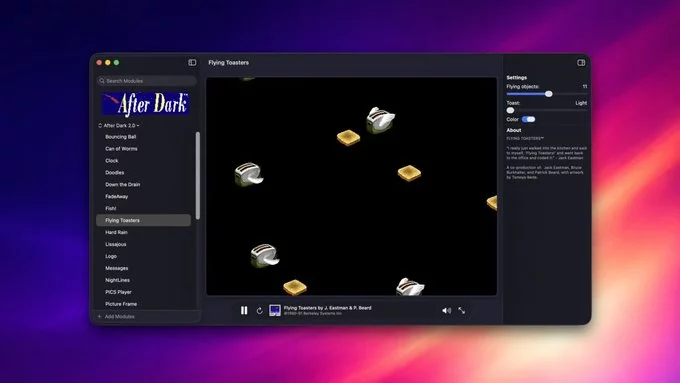
For anyone who spent the 1990s staring at a Mac monitor, the name After Dark evokes instant nostalgia. The iconic screen savers—from the flying toasters to the bouncing ball—are back, but this time for modern macOS. A dedicated fan has built a new app that faithfully recreates the classic experience, bringing those beloved animations to contemporary Apple hardware.
This isn’t an official release from the original developers, but a labor of love from a developer who grew up with the software. The app runs natively on current macOS versions, ensuring that the old animations look crisp on Retina displays without requiring emulation or virtual machines. It’s a direct port of the original code, painstakingly adapted for today’s system architecture.
The goal is simple: preserve a slice of computing history so that a new generation can enjoy the same whimsical distractions their parents did. For those who remember the “flying toasters” filling their screens after a few idle minutes, this return is a welcome trip down memory lane.
You don’t need to hunt through dusty CDs or risk shady downloads to bring back the nostalgia. The entire collection is available as a free, open-source app hosted on GitHub. This means you can download the project directly from its official repository without paying a cent.
To begin, visit the project’s GitHub page and locate the “Releases” section on the right-hand sidebar. From there, download the latest .dmg file for macOS. Once the download finishes, open the disk image and drag the app icon into your Applications folder. Because the software is not signed by Apple’s notarization process, you may need to right-click the app and select “Open” the first time to bypass Gatekeeper. After that, launch it, grant the necessary screen-recording permission in System Settings, and your classic screensavers will be ready to activate under Desktop & Screen Saver preferences.
The headline act is, of course, the iconic Flying Toasters, but this collection goes beyond that beloved classic. You’ll also find other memorable modules from the original After Dark library, such as Flying Toasters’ siblings and fan favorites like Bad Dog, Mowing, and the whimsical Fish.
However, it’s important to set expectations: this is a curated selection, not a complete archive. Many original modules are missing from this release. The roster focuses on the most requested and visually distinctive screen savers, omitting a significant number of the quirky, lesser-known options that longtime fans might remember. So, while you get the essential toasters and a few other highlights, don’t expect the full, exhaustive menu of every module ever shipped. This is a tasteful homage, not a comprehensive museum of every After Dark oddity. For a full list of what’s actually included, check the official module list.
To run the revived screen savers, your Mac must be running macOS 12 Monterey or later. This ensures compatibility with modern system frameworks and security standards. The project is built directly on the original After Dark code, which has been carefully adjusted to compile and function correctly on current Apple silicon and Intel-based Macs.
These adjustments address changes in how macOS handles display sleep, multi-monitor setups, and window server interactions, which have evolved significantly since the classic screensavers were first released. While the visual charm and behavior of the originals remain intact, the underlying code has been updated to meet contemporary system requirements.
For the best experience, ensure your Mac is updated to at least Monterey. The screensavers are designed to run seamlessly on both Apple silicon (M1 and later) and Intel models that support this macOS version. No additional third-party software is required, and the installation process is straightforward, allowing you to quickly bring back the nostalgic Flying Toasters and other classic animations to your modern desktop.







Comment