Alerts

-
3 minutes, 18 seconds
For millions of people, the simple act of reading a message, checking a map, or watching a video while riding in a car, train, or bus triggers an immediate and unpleasant physical response. This is motion sickness, a condition where the brain receives conflicting signals from the inner ear, eyes, and sensory nerves. Your body feels movement, but your eyes are focused on a static screen, creating a sensory mismatch that leads to dizziness, nausea, and cold sweats.
This problem is particularly acute for the modern commuter or passenger who relies on a smartphone or tablet for work and entertainment. The need for a practical solution is clear, as current workarounds—like taking medication or simply staring out the window—are not always convenient or effective. This is where new technology steps in, aiming to let us use our devices comfortably without the dreaded queasiness.
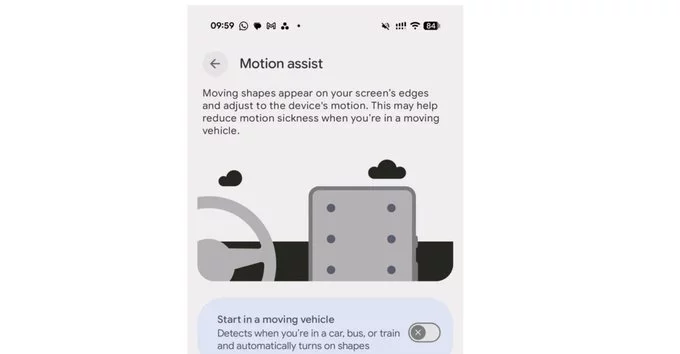
Apple’s answer to motion sickness is a clever software-based system rather than a hardware fix. The technology works by displaying black dots at the edges of the screen that move in sync with the vehicle’s motion, as detected by the device’s built-in sensors. This creates a visual reference that matches your body’s sense of movement, reducing the sensory conflict in your brain that triggers nausea. Because the dots are black and subtle, they don’t interfere with reading or watching content, yet they provide just enough spatial awareness to keep most users comfortable. In testing, the effect has been remarkably effective, with many users reporting they can now read or watch videos during car rides without feeling sick. The system is designed to be unobtrusive, so you can simply turn it on in settings and forget it’s there, letting the subtle cues do their job while you enjoy your commute or road trip. It’s a practical, low-cost solution that makes a huge difference for frequent travelers.
The core trick is a deliberate mismatch between what you see and what you feel. When you’re in a moving car, your inner ear senses the physical motion—the bumps, turns, and acceleration. But if your eyes are fixed on a static screen, they tell your brain you’re sitting still. This sensory conflict is what triggers nausea.
Apple’s system uses visual and motion cues to bridge that gap. By displaying moving dots or subtle animated patterns at the edges of the screen, it creates a peripheral visual reference that mimics the car’s actual movement. Your brain then receives a more consistent story: the eyes see motion that matches the inner ear’s signals. This reduces the confusion, allowing your brain to relax instead of triggering a defensive queasy response. The effect is a calmer, more tolerable experience without requiring you to look away from the display.
Apple’s anti-nausea technology is available across a range of devices, but the specific feature you can use depends on your hardware and operating system. For the most advanced implementation, which dynamically adjusts the display to reduce sensory conflict, you will need an iPhone or iPad running iOS 18 or iPadOS 18 or later. This includes models from the iPhone XS and newer, as well as most iPad Pro, iPad Air, and iPad mini models released in the past few years.
For Mac users, the feature is integrated into macOS Sequoia and later, and works with Apple Silicon Macs. To enable it, follow these steps:
Once enabled, you can also add the feature to your Control Center for quick access while traveling.









Comment