Alerts

-
5 minutes, 45 seconds
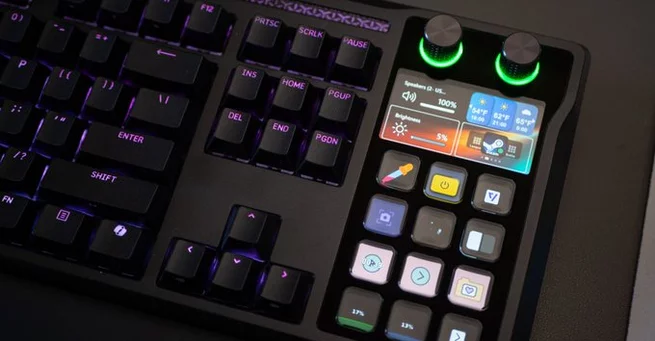
Gamers and productivity enthusiasts often wonder: what happens when a high-end mechanical keyboard meets a fully integrated Stream Deck? The Corsair Galleon 100 SD answers that question with style, merging over a dozen customizable buttons, dials, and a multi-function screen into a single, full-size keyboard. Whether you’re streaming, multitasking, or just trying to control smart devices from your desk, this hybrid design promises to make life easier—and more fun.
The Corsair Galleon 100 SD isn’t just a keyboard—it’s a powerhouse of customization. On its side sits a Stream Deck panel complete with 12 buttons, two dials, and a mini OLED screen. These controls put advanced shortcuts right where your hands already type, eliminating the need to reach for a separate device. You can trigger macros, control lighting, launch apps, or even adjust your music without missing a beat.
This integration highlights why Stream Deck technology has grown so popular: it’s incredibly versatile. You don’t need to be a streamer to benefit. From controlling smart lights to managing browser windows, the Galleon makes everyday tasks feel like a professional setup.
One of the standout features is the keyboard’s plug-and-play compatibility with a wide range of apps and systems. Using the Stream Deck software, you can assign functions to buttons and dials for apps like YouTube Music, web browsers, or even productivity tools. The dials, in particular, allow precise adjustments—perfect for audio, brightness, or smart home controls.
For example, you can dim Philips Hue lights with a single turn, skip a track, or launch a favorite website instantly. Every action can be performed without removing your hands from the keyboard, making the Galleon a true productivity booster for power users and gamers alike.
The Galleon 100 SD didn’t appear out of thin air. Corsair acquired Elgato in 2018, the company behind Stream Deck, and merged it with iDisplay, a specialist in tiny OLED screens. Interestingly, iDisplay had previously supplied the screens for the Art Lebedev Optimus Maximus keyboard back in 2008—a keyboard that, while groundbreaking, didn’t succeed commercially. The Galleon builds on that legacy, refining the concept into something both practical and fun.
This history shows that Corsair’s gaming division isn’t just making gear—it’s evolving hardware that anticipates user needs, blending gaming, streaming, and general productivity tools into one cohesive device.
Physically, the Galleon 100 SD feels sturdy and premium. Keys are responsive, tactile, and satisfyingly clicky, while the integrated screen and controls feel smooth and durable. At $350, it sits in a mid-to-high price range for gaming keyboards, but the extra functionality justifies the cost. You get a keyboard that doubles as a miniature command center for your desktop setup, which is hard to match in this category.
Corsair also made sure the layout is ergonomic, keeping buttons within easy reach without cluttering the desk. The dials and screen complement the main keyboard rather than distracting from it, providing a balanced and efficient design.
This keyboard is ideal for anyone who spends long hours at a desk and craves control over multiple workflows. Streamers, content creators, and productivity enthusiasts will appreciate the convenience of integrated shortcuts. Gamers will enjoy how quickly the buttons can adjust settings without pausing gameplay. Even casual users who enjoy experimenting with macros and smart devices will find plenty of value.
The Corsair Galleon 100 SD isn’t just a keyboard; it’s a flexible tool that brings professional-level control to any desk setup.
Corsair has successfully merged the functionality of a Stream Deck with a high-quality mechanical keyboard, creating a device that excels in versatility and convenience. From smart home control to content creation shortcuts, the Galleon 100 SD proves that a keyboard can do more than just type. For $350, it offers innovation, practicality, and fun—making it one of the most intriguing hybrid keyboards on the market today.










Comment