
Alerts
-
5 minutes, 40 seconds
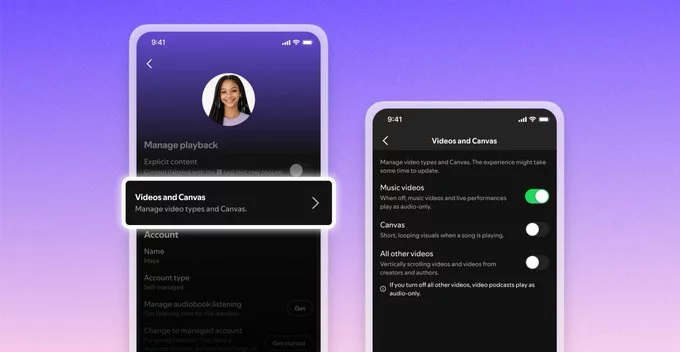
Frustrated by videos automatically playing while listening to music or podcasts? Spotify has introduced new video controls that allow users to turn off all video content entirely. Rolling out globally, this feature gives listeners more control over their experience, helping save data, reduce distractions, and improve battery life. For users who prefer audio-only streaming, this update answers a long-standing request in a simple but impactful way.
Streaming platforms have increasingly leaned into video content, blending music, podcasts, and visual experiences. While some users enjoy music videos and video podcasts, others find them unnecessary or even disruptive. Spotify’s latest update recognizes that not every listener wants visuals interrupting their audio flow.
With the new controls, users can easily disable videos across the platform. This means no more automatic video playback when opening podcasts or switching tracks. The listening experience becomes cleaner and more focused, especially for those using the app while commuting, studying, or working.
This change reflects a broader shift toward user personalization. Instead of forcing features on everyone, platforms are beginning to offer flexible controls that adapt to different preferences.
One of the biggest advantages of turning off videos is improved performance. Video streaming consumes significantly more data than audio, which can be a concern for users with limited data plans. By disabling videos, listeners can reduce data usage without sacrificing content quality.
Battery life is another key benefit. Continuous video playback can quickly drain a smartphone’s battery, especially during long listening sessions. With videos turned off, users can enjoy extended playback without worrying about frequent charging.
Additionally, the app may run more smoothly overall. Removing video elements can reduce buffering issues and improve loading speeds, particularly in areas with slower internet connections.
Spotify’s decision to roll out video controls globally comes as competition in the streaming space continues to intensify. Platforms are constantly experimenting with new formats to keep users engaged, but not every innovation resonates with all audiences.
User feedback has likely played a major role in shaping this update. Many listeners have expressed a desire for more control over how content is delivered, especially when it comes to autoplay features. By responding to these concerns, Spotify strengthens its reputation as a user-focused platform.
The timing also aligns with growing awareness around digital wellbeing. More users are actively seeking ways to reduce screen time and minimize distractions. Audio-only listening supports this trend, making the feature even more relevant in today’s tech landscape.
While the ability to turn off videos benefits listeners, it also raises questions for creators who invest in video content. Video podcasts and music visuals have become an important part of engagement strategies, offering additional ways to connect with audiences.
However, this update doesn’t remove video content entirely—it simply makes it optional. Creators can still produce video-rich experiences, while users who value them can keep the feature enabled. This balance ensures that creative flexibility remains intact without compromising user choice.
For podcasters, it may even encourage a renewed focus on audio quality. Strong storytelling, clear sound design, and engaging conversations become even more critical when visuals are no longer guaranteed.
At first glance, the ability to turn off videos might seem like a minor update. In reality, it addresses several key pain points for users, from data consumption to distraction management. It also signals a shift toward more thoughtful feature design, where user preferences take center stage.
As the rollout continues worldwide, more listeners will gain access to these controls. Whether you’re a casual listener or a daily streamer, the option to customize your experience makes a noticeable difference.
Spotify’s latest move proves that sometimes, the most valuable updates aren’t about adding more features—but giving users the freedom to use fewer.










Comment