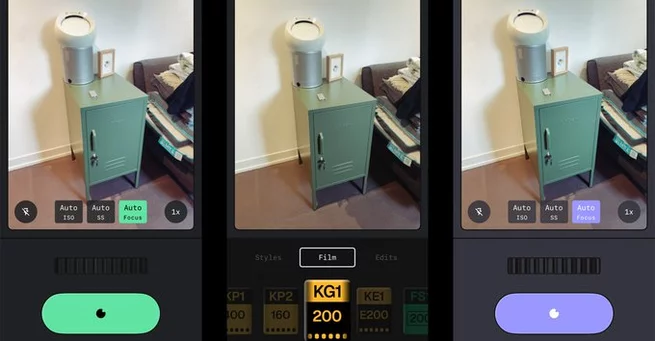
Photographers and iPhone users can now shoot and edit photos without leaving Snapseed. Google has introduced a native camera to the iOS version of Snapseed, bringing professional-level controls, preset film effects, and new customization options. This update transforms the once strictly editing-focused app into a complete photography tool, answering the demand for more integrated mobile photo experiences.
Snapseed’s camera supports both automatic shooting and manual adjustments, making it suitable for beginners and advanced users alike. You can now tweak ISO, shutter speed, focus, and use flash or zoom directly within the app. Saved looks and edit stacks can also be applied while shooting, allowing real-time creative control.
Snapseed’s new camera isn’t just a gimmick—it’s designed for serious photography. Manual settings allow precise control over exposure, focus, and motion blur, giving users the flexibility often reserved for standalone cameras.
Whether you’re adjusting shutter speed for a crisp action shot or fine-tuning ISO for low-light scenes, Snapseed now provides the tools to capture exactly what you envision. Even casual photographers benefit, as the automatic mode still offers high-quality results without needing any adjustments.
One standout feature is Snapseed’s range of retro film effects. Users can apply looks inspired by iconic Kodak, Fujifilm, and other classic films, giving photos a vintage aesthetic instantly. These preset effects work seamlessly with Snapseed’s existing edit stacks, allowing further tweaks after the photo is captured.
Film enthusiasts will appreciate how these effects recreate the depth, grain, and color tones of traditional analog photography, making digital shots feel more authentic. With just a few taps, users can transport their photos to the nostalgic charm of classic film photography.
Snapseed 3.1 also introduces a variety of UI color themes. Users can choose their favorite palette to make the editing experience more enjoyable and visually appealing. While subtle, this feature improves usability and adds a personal touch for creative workflows.
Customizable interfaces aren’t just cosmetic—they can reduce eye strain during long editing sessions and make the app feel uniquely yours. This attention to detail reflects Google’s renewed focus on improving Snapseed after years of minimal updates.
This iOS update marks Snapseed’s second major overhaul in under a year. Google first revived the app in June 2025 with a complete redesign, version 3.0, after years of sporadic support since acquiring it in 2012. Until now, Android users haven’t received the new camera, but Google has confirmed a rollout is coming in the next few months.
The camera quietly appeared in late 2025 through limited access points like widgets and Control Center shortcuts, but it is now fully integrated and easily accessible via an icon in the app’s main interface. This update signals Google’s commitment to making Snapseed a full-featured photography platform rather than just an editing app.
By combining professional camera controls, retro film effects, and customizable themes, Snapseed now offers a complete mobile photography experience. Users can shoot, edit, and apply creative effects without leaving a single app. For iPhone photographers looking for convenience without sacrificing quality, this update is a game-changer.
As Google continues to enhance Snapseed, iOS users can expect more features designed to bridge the gap between casual smartphone photography and professional-level editing. Whether you’re capturing daily moments or experimenting with creative photography, Snapseed’s new camera makes it easier than ever to bring your vision to life.
Snapseed Camera on iOS: Google Brings Pro Too... 0 0 0 1 2
2 photos





Array