Alerts

-
5 minutes, 13 seconds
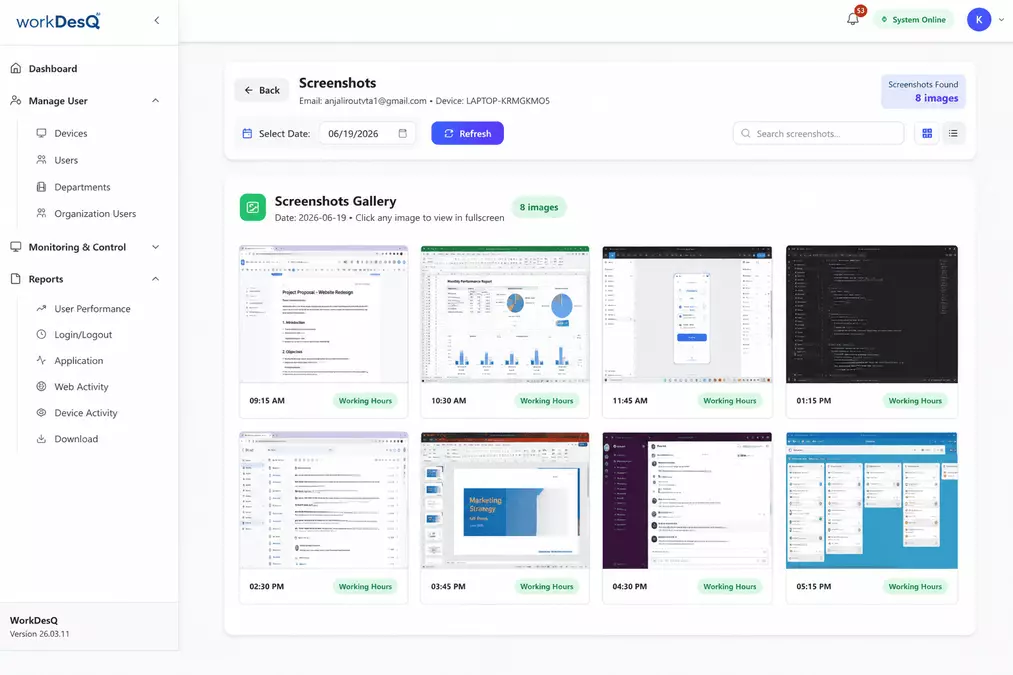
Many businesses invest in screen monitoring tools to understand how employees spend their workday. But one question often comes up: Can screen monitoring software actually reduce unproductive work?
The answer is yes—but only when it is used correctly. Screen monitoring software should help managers understand work habits, identify productivity challenges, and support employees instead of simply watching their screens.
In this guide, you'll learn what unproductive work with screen monitoring software means, what causes it, how screen monitoring helps businesses improve productivity, and the best practices for using it fairly and effectively.
Unproductive work is any activity that does not contribute to completing assigned business tasks during working hours.
This does not mean employees should work without breaks. Short breaks are healthy and help employees stay focused throughout the day.
Examples of unproductive work include:
Understanding these activities helps businesses improve productivity without making unfair assumptions.
Screen monitoring software helps businesses understand how employees use their computers during working hours.
Depending on company settings, it may provide:
The goal is not to watch every employee all day. Instead, it helps managers understand work patterns and identify areas where support is needed.
Screen monitoring software does not automatically decide whether someone is productive.
Instead, it collects workplace activity that managers can review.
Common indicators include:
Long Idle Time
Extended periods without keyboard or mouse activity may suggest employees are away from work.
Excessive Non-Work Websites
Frequent visits to entertainment or shopping websites during working hours may reduce productivity.
Low Business Application Usage
Employees spending very little time in business applications may need additional support or clearer priorities.
Repeated Work Interruptions
Constant switching between unrelated applications can reduce focus and slow project completion.
These reports help managers understand work habits instead of making decisions based on guesswork.
Before taking action, employers should understand why employees become less productive.
Unclear Priorities
Employees may not know which tasks should come first.
Too Many Meetings
Long meetings leave less time for focused work.
Poor Time Management
Without proper planning, employees may lose valuable work hours.
Workplace Distractions
Phone notifications, social media, and personal responsibilities can interrupt concentration.
Lack of Motivation
Employees who feel disconnected from company goals may become less engaged.
Finding the real cause is always more helpful than assuming poor performance.
Businesses that use screen monitoring responsibly can gain valuable workplace insights.
Better Productivity Reports
Managers understand where working hours are spent.
Improved Time Management
Employees become more aware of how they use their workday.
Fair Performance Reviews
Performance discussions are based on real work data instead of personal opinions.
Better Resource Planning
Managers can identify overloaded employees and balance workloads more effectively.
Support for Remote Teams
Remote employees receive the same level of visibility as office employees without unnecessary micromanagement.
Using software alone will not improve productivity.
Employers should also follow these best practices.
Set Clear Expectations
Employees should understand their goals and priorities.
Encourage Regular Communication
Weekly check-ins help resolve problems before they grow.
Respect Employee Privacy
Employees should know what information is collected and why.
Focus on Results
Completed work is more valuable than constant screen activity.
Use Reports to Coach Employees
Reports should help employees improve rather than punish them.
Many companies make mistakes when introducing screen monitoring software.
Monitoring Every Minute
Constant monitoring creates stress instead of productivity.
Ignoring Work Quality
High activity does not always mean high-quality work.
Relying Only on Screenshots
Screenshots show moments, not overall performance.
Not Explaining the Purpose
Employees are more comfortable when companies clearly explain why monitoring is being used.
Transparency builds trust.
Modern workforce management software like WorkDesQ helps businesses understand unproductive work with screen monitoring software through easy-to-read reports and productivity insights.
WorkDesQ provides:
Instead of relying on assumptions, managers can use real workplace data to support employees, improve workflows, and make better business decisions.
Managers sometimes believe employees are unproductive simply because they cannot see them working.
However, workplace data often tells a different story.
Employees may spend hours:
Good management depends on understanding the complete picture rather than judging isolated moments.
Understanding unproductive work with screen monitoring software is not about watching employees every minute. It is about identifying work patterns, removing distractions, and helping employees perform at their best.
When businesses combine clear expectations, open communication, and reliable productivity data, they create a workplace built on trust, accountability, and continuous improvement.
The goal is not simply to reduce unproductive work—it is to help employees succeed while supporting long-term business growth.
What is unproductive work with screen monitoring software?
It refers to identifying work activities that reduce productivity, such as excessive non-work websites, long idle periods, or frequent distractions during working hours.
Does screen monitoring software improve employee productivity?
Yes. When used fairly, it helps businesses understand work patterns, improve time management, and support better performance.
Can screen monitoring software track application usage?
Yes. Most modern screen monitoring software provides reports showing how employees use business and non-business applications.
Is screen monitoring software suitable for remote employees?
Yes. It helps managers understand productivity across office, remote, and hybrid teams while supporting fair performance evaluations.
How should employers use screen monitoring software?
Employers should use it transparently, focus on improving productivity, respect employee privacy, and combine reports with regular communication instead of relying only on monitoring.


8.3K articles

2.7K articles

1.6K articles

34 articles








Comment