
Alerts
-
3 minutes, 27 seconds
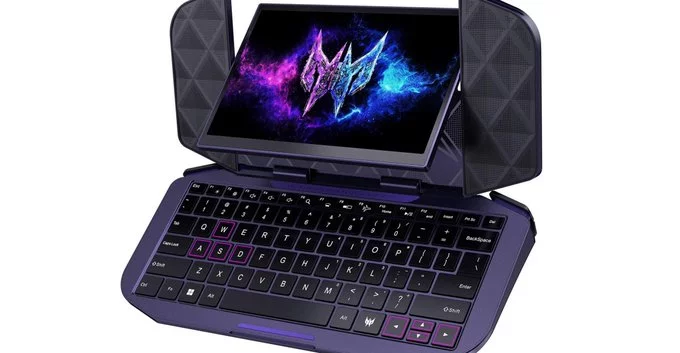
Project DualPlay Mini is a bold experiment in portable computing, designed to address the friction between traditional laptop layouts and modern, touch-first interactions. At its core, the device challenges the static nature of clamshell designs by introducing a unique dual-hinge mechanism. This allows the integrated display to swivel a full 180 degrees, transforming the system from a standard notebook into a flat, shareable tablet surface without requiring any detachable parts. The hardware is engineered for versatility, but its most distinctive trait lies in how it reconfigures physical space.
Complementing the swivel is a flip-out keyboard that tucks neatly beneath the main chassis when not in use. Unlike conventional magnetic covers, this keyboard is mechanically linked, flipping outward to provide a stable typing angle when deployed. When the screen is reversed for presentation or media consumption, the keyboard can remain hidden, keeping the device’s footprint minimal. This combination of a rotating display and a stowable physical keyboard sets Project DualPlay Mini apart, offering a glimpse into a future where laptops adapt to the user’s posture rather than the other way around.
The centerpiece of Project DualPlay Mini is its display, which is not merely attached but engineered to swivel a full 360 degrees. This rotational freedom allows the screen to pivot from a standard laptop orientation to a flat, tablet-like mode, or to face outward for presentations and media sharing. The hinge mechanism is designed to hold firm at any intermediate angle, enabling precise adjustments for ergonomic comfort or to reduce glare in bright environments.
Beyond simple rotation, the swivel integrates with the device’s adaptive software. When the screen is reversed, the system automatically switches to a “presentation mode,” mirroring content for an audience. In a tent or stand orientation, it optimizes for touch input, while a slight tilt can activate a “focus mode” that dims peripheral notifications. This physical flexibility is paired with a sensor that detects the screen’s position, ensuring the interface always matches how you are holding or viewing the device—whether in landscape, portrait, or any angle in between.
For users who miss the tactile feedback of physical keys, the flip-out keyboard is a standout addition. When typing is needed, the keyboard swings out from the device’s body, transforming the touchscreen interface into a more traditional laptop-like setup. This mechanism is designed to be sturdy yet compact, ensuring it does not add significant bulk when stowed away.
The keyboard provides a satisfying click and travel distance, which can reduce errors compared to on-screen typing. It is especially useful for long emails, documents, or coding sessions where speed and accuracy matter. The hinge mechanism is engineered to lock firmly in place, preventing wobble during intense use. When not required, the keyboard folds back flush, protecting the keys and maintaining the device’s sleek profile. This hybrid approach offers the best of both worlds—portability of a tablet with the productivity of a clamshell—without forcing users to carry a separate accessory.
The DualPlay Mini’s design fundamentally shifts how we interact with a laptop. In a presentation scenario, the swiveling screen allows you to face your audience without turning the entire device, while the flip-out keyboard can be handed to a collaborator for real-time input, turning a solo pitch into an interactive session. For media consumption, the screen can be angled upright on a desk or bed, with the keyboard acting as a detached remote, creating a more comfortable viewing posture than a traditional clamshell.
This flexibility points to a future where the laptop form factor is no longer rigid. By decoupling the keyboard and enabling screen rotation, the design blurs the line between a workstation and a tablet. The potential impact is significant: it could reduce the need for separate external monitors or stands in mobile setups, and it challenges manufacturers to rethink hinge durability and wireless connectivity. Ultimately, this concept suggests a move toward more modular, adaptable personal computing that prioritizes user context over a fixed shape.









Comment