
Alerts
-
3 minutes, 10 seconds
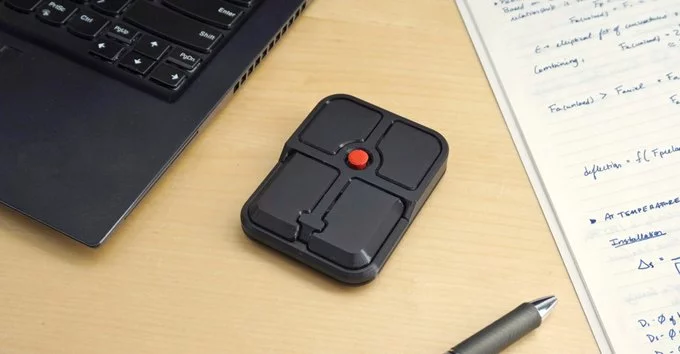
If you love the ThinkPad’s famous red TrackPoint nub but wish you could use it with any computer, Ploopy has the answer. Their new mouse brings that iconic pointing stick to a portable, desktop-friendly design. This means you can enjoy precise cursor control without lifting your fingers—even on a PC, Mac, or Linux system.
Ploopy is known for open-source, ergonomic peripherals. Their latest mouse is a standalone device that features a TrackPoint (the small red joystick between the G, H, and B keys) as its main navigation tool. It connects via USB-C and works out of the box with most operating systems. You get the same tactile feel as a ThinkPad laptop, but now it’s a separate mouse you can use anywhere.
This mouse is perfect for ThinkPad fans who miss the TrackPoint when using a desktop. It’s also great for programmers, writers, and anyone who wants precise control without moving their hand. If you already use a TrackPoint on a laptop, this mouse feels natural and familiar.
To maximize your experience, start with the default sensitivity and adjust gradually. The TrackPoint works best with light pressure—no need to push hard. You can also remap buttons to suit your workflow, like setting the middle button for scrolling. Explore Ploopy’s online community for custom firmware tweaks that improve speed or add new features.
Ploopy’s new mouse successfully makes the ThinkPad’s iconic TrackPoint portable. It combines a beloved input method with modern flexibility, giving you control and comfort wherever you work. Whether you’re a longtime ThinkPad user or just curious about alternative mice, this device is worth a try.










Comment