Pixelmator Pro Launches on iPad With Apple Pencil Support
Apple has officially brought Pixelmator Pro to the iPad, offering creators a powerful, touch-optimized image editing experience. Users can now enjoy full Apple Pencil support, seamless Mac and iPad workflow, and all the advanced editing features that made the Mac version a favorite among professionals. If you’ve been looking for a serious editing tool on iPad, this update could change the way you create.
A Touch-Optimized Workspace for iPad Creators
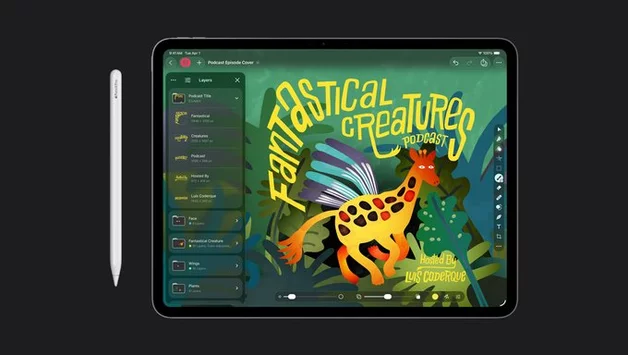
Pixelmator Pro for iPad introduces a workspace designed specifically for touch controls, making it easier than ever to manipulate images on the go. The app supports iPad models with the A16, A17 Pro, or M1 chip or later, running iPadOS 26 or above. From layering multiple images to adding shapes, text, or even video, the iPad version mirrors the powerful functionality of its Mac counterpart while leveraging the convenience of a mobile interface.
Apple Pencil Integration Transforms Editing
One of the standout features of Pixelmator Pro on iPad is its deep integration with Apple Pencil. Pressure-sensitive brushing, hover detection, squeeze gestures, and double-tap shortcuts allow for precise control over edits. Artists and photographers can now sketch, paint, and retouch images with unprecedented responsiveness, making the iPad a genuine alternative to traditional desktop editing setups.
Advanced Editing Tools and AI Features
Pixelmator Pro brings all the Mac app’s signature tools to iPad, including smart selection for isolating objects, advanced bitmap and vector masks, and Super Resolution for upscaling images without losing detail. The app also includes Deband to remove compression artifacts and Auto Crop, which suggests improved image compositions automatically. Apple describes these as intelligent features, enhancing the creative workflow for professionals and enthusiasts alike.
Seamless Workflow Between iPad and Mac
For users who work across devices, Pixelmator Pro allows a smooth transition between iPad and Mac. Projects can be opened, edited, and saved on either device without losing functionality. This makes it easier for creative professionals to start a project on the go and finish it in their studio, eliminating compatibility frustrations that often come with switching platforms.
Apple Creator Studio Subscription Unlocks Premium Features
Pixelmator Pro for iPad is available through the Apple Creator Studio subscription, priced at $12.99 per month or $129 per year in the U.S. Subscribers gain access to premium tools, including the new Warp feature for twisting and reshaping image layers. While the Mac app can still be purchased outright for $49.99, certain intelligent features and premium content will only be available through the subscription. This approach aims to give creators more flexibility while keeping the app’s core tools accessible to all users.
Moving From Pixelmator to Pixelmator Pro
Apple notes that the original Pixelmator app for iPad and iPhone will no longer receive updates. Users seeking the latest features and improvements will need to upgrade to Pixelmator Pro. With its robust editing suite, touch-first interface, and Apple Pencil support, the Pro version promises to redefine image editing on iPad.
Pixelmator Pro’s launch on iPad is a significant step for Apple, combining professional-grade tools with mobile convenience. Whether you’re a digital artist, photographer, or designer, this release offers new ways to edit, create, and experiment anywhere.





Array