Alerts

-
3 minutes, 23 seconds
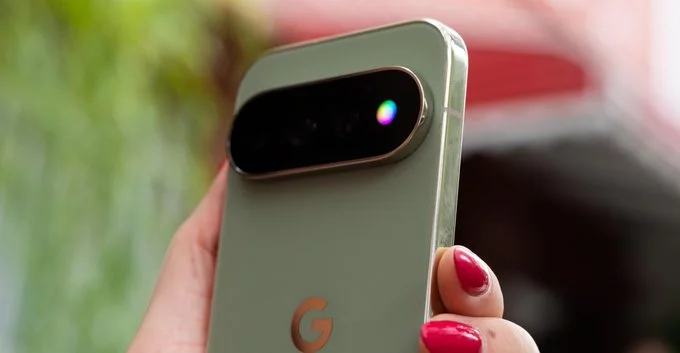
Out of the box, the Pixel 11 Pro’s HiLight notification LED is nearly useless. Google’s new feature, which sits on the back of the device, promises at-a-glance alerts, but its default behavior is staggeringly limited. In fact, the only two scenarios that trigger a glow are when the phone is face down and you’re actively interacting with Gemini, or when you receive a call from a favorite contact. That’s it. No missed texts, no calendar reminders, no battery warnings.
Even when HiLight does activate, the customization is painfully restrictive. Users are locked into a palette of just five colors, which severely limits the ability to distinguish between different types of notifications at a glance. For a feature that was likely designed to reduce screen time, the stock experience offers almost no practical utility. It feels less like a helpful tool and more like a tech demo, leaving users to wonder why Google shipped such a constrained version of what could be a genuinely useful feature. Fortunately, developers are already stepping in to fill the gap.
While Google has kept HiLight locked to just two triggers and five colors, independent developers are already stepping in to expand its potential. These creators are building apps that give users far more control over the notification LED, addressing limitations the stock software leaves unaddressed.
Early community efforts focus on practical enhancements that Google hasn't implemented. For example, some developers are working on apps that let you assign specific colors to different contacts, rather than being limited to a single "favorite" category. Others are exploring ways to trigger the light for a wider range of notifications, such as emails or messages from any app, not just calls or Gemini interactions.
This push shows a clear demand for a more versatile HiLight. The core issue is that out of the box, the LED only glows for face-down Gemini interactions or calls from a favorite contact. Developers are bypassing these restrictions to create a more useful tool, proving that the hardware's potential goes far beyond what Google currently permits.
The app transforms HiLight from a gimmick into a genuinely functional tool by addressing its two biggest limitations: notification sources and color options. While the stock Pixel 11 Pro only lights up for Gemini interactions or calls from favorite contacts, this app expands the trigger system significantly. You can now assign HiLight to virtually any app or notification type on your device, ensuring the LED is actually useful for your daily workflow.
Beyond just expanding what triggers the light, the app tackles the restrictive five-color palette. Instead of being limited to the default options, you gain granular control over the exact hue for each notification category. This means you can instantly distinguish between a message from a specific contact, a calendar alert, or a social media update without touching your phone. The customization is deep, allowing you to create a personalized visual language that works for you—making HiLight a proactive notification tool rather than a passive novelty.
The app demonstrates a practical workaround for the Pixel 11’s limited HiLight feature, addressing the constraints that made the notification LED nearly useless out of the box. By expanding the utility beyond the default two triggers—face-down Gemini interactions and calls from favorite contacts—the app gives users significantly more control over when and how the LED glows. This includes breaking free from the restrictive five-color palette, allowing for more personalized and informative notifications.
While Google’s implementation felt overly limited, this developer-driven solution shows that the hardware is capable of much more. The app effectively transforms HiLight from a gimmick into a genuinely useful tool, proving that third-party developers are already doing what Google won’t. For Pixel 11 Pro owners who felt constrained by the stock experience, this offers a clear path to unlocking the feature’s full potential and tailoring it to their specific needs.










Comment