
Alerts
-
3 minutes, 49 seconds
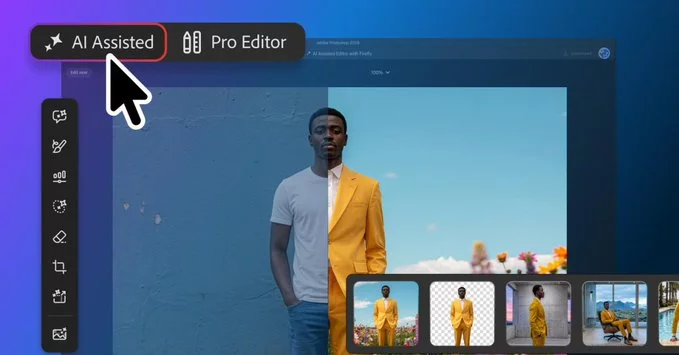
Adobe has introduced a new AI Assisted Editor interface in Photoshop, marking a significant shift in how users interact with the software’s artificial intelligence capabilities. This updated interface consolidates a range of AI features into a single, simplified toolbar, moving away from the previously scattered menus and panels. The goal is to provide a more cohesive and direct access point for these powerful tools, reducing the need for users to remember complex keyboard shortcuts or navigate multiple dropdowns.
By gathering these functions together, Adobe aims to streamline the creative workflow. The AI Assisted Editor is designed to make the technology more approachable, allowing both novices and professionals to leverage AI-driven enhancements without interrupting their creative flow. This initial introduction sets the stage for a more integrated and intuitive Photoshop experience, as detailed in the following sections on the toolbar’s specific design and its broader impact on user experience.
Adobe’s AI features are now consolidated into a dedicated, simplified toolbar within the editor. This design choice directly reduces visual clutter by removing the need to hunt through nested menus or dense panels. Instead of scattering generative functions across the interface, the toolbar groups them in one clearly visible location, which makes the tools significantly more discoverable for both new and returning users.
The streamlined layout prioritizes the most essential AI actions, allowing users to focus on their creative workflow without distraction. By presenting these capabilities in a straightforward, icon-based format, the interface lowers the learning curve and encourages experimentation. This approach aligns with Adobe’s broader goal of making advanced technology accessible, ensuring that powerful features are not hidden but are immediately present when a user needs them. The result is a cleaner workspace that supports efficiency and intuitive navigation, directly addressing the common problem of feature overload in complex software. This simplification is a core part of the new editor’s design philosophy.
The new design aims to streamline workflows by grouping AI-powered tools together, potentially improving efficiency for users. This consolidation reduces the need to hunt through disparate menus, allowing for a more intuitive and faster creative process.
This organizational shift is designed to help users maintain creative momentum, as the need to switch between unrelated toolbars is significantly reduced. For those who rely heavily on AI-assisted edits, the new layout promises a more coherent and less disruptive experience, directly supporting a smoother path from initial concept to final output.
This update reflects Adobe’s commitment to integrating AI more deeply into Photoshop, offering a more intuitive way to leverage AI capabilities. For users, the practical effect is a shift from memorizing complex command chains to describing the desired outcome. Instead of layering masks and adjustments, you can now instruct the tool directly, which lowers the barrier for complex edits.
However, this deeper integration also changes the workflow. The AI Assisted Editor acts as a collaborative partner, not just a filter. Users will need to develop new skills in prompt phrasing and learning to review AI suggestions critically.
For seasoned professionals, this isn’t about replacing expertise, but about reallocating it toward final artistic direction rather than repetitive technical steps. The enhanced user experience is designed to make this transition as seamless as possible, but it still requires a conscious adaptation of your established habits. The core promise is that these AI tools will handle the heavy lifting of pixel manipulation, freeing you to focus on the creative vision that only you can define. This is a fundamental evolution from using Photoshop as a manual instrument to directing it as an intelligent assistant.









Comment