


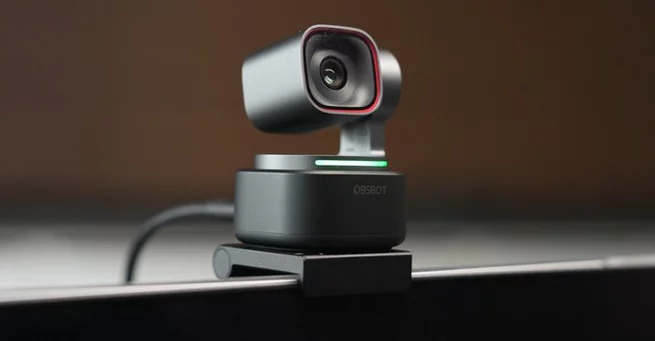
Obsbot Tiny 3 Webcam Sparks Price Shock Despite Premium AI Promise
-
5 minutes, 52 seconds
The Obsbot Tiny 3 webcam arrives with bold claims, premium pricing, and a clear target: creators and professionals who want an intelligent, hands-free camera experience. Priced at $350, it promises top-tier 4K quality, AI tracking, and voice control in a remarkably small body. Buyers searching for answers usually want to know one thing—does it truly outperform cheaper alternatives? After weeks of hands-on use, the answer is more complicated than the marketing suggests.
Obsbot Tiny 3 Webcam Launches With Ambitious Claims
Obsbot positions the Tiny 3 as its most advanced gimbal webcam yet, highlighting its compact design and pan-tilt-zoom capabilities. Weighing just 63 grams, it is impressively light for a motorized 4K webcam. The company also released a cheaper Tiny 3 Lite, but the flagship model is meant to represent the best Obsbot has to offer.
On paper, the Tiny 3 checks nearly every box modern buyers care about. It supports 4K resolution, AI-powered face tracking, gesture and voice commands, and multiple preset camera positions. For streamers, remote workers, and presenters, this combination sounds ideal. However, premium features naturally invite premium scrutiny.
Image Quality Is Good, But Not a Game Changer
In everyday use, the Obsbot Tiny 3 webcam delivers sharp, clean video with accurate colors under good lighting. The slightly larger sensor does provide a noticeable improvement in clarity compared to older generation webcams. Faces appear well-defined, and motion tracking remains smooth during normal movement.
That said, the improvement is incremental rather than transformative. In side-by-side use, the difference between the Tiny 3 and strong competitors is visible but subtle. Low-light performance also fails to justify the steep price jump, with grain and softness appearing sooner than expected for a camera at this level.
AI Tracking and Voice Control Feel Impressive—Then Awkward
One of the Tiny 3’s headline features is its AI-powered tracking combined with voice commands. Simple phrases allow users to wake the camera, enable tracking, or switch to saved positions without touching software. The microphone array does an excellent job picking up commands, even when spoken quietly.
However, convenience can quickly turn uncomfortable. The camera may respond to phrases spoken during calls or meetings, triggering movement unexpectedly. While accuracy is impressive, the experience can feel intrusive, leading many users to disable voice control entirely after initial testing.
Desk Mode and Design Trade-Offs Matter
The Obsbot Tiny 3 includes a Desk Mode that allows the camera to tilt downward, making it useful for demonstrations or tabletop views. This feature is absent on the cheaper Lite version due to its thicker base, giving the flagship model a functional edge.
Build quality feels solid, and the minimalist design blends well into professional setups. Still, the tiny form factor introduces compromises. The gimbal movement, while smooth, is audible in quiet rooms, and the camera’s constant motion can be distracting during longer sessions.
Software Experience Undermines the Hardware
Where the Obsbot Tiny 3 webcam struggles most is software. The companion app offers an overwhelming number of settings, modes, and AI options. Instead of feeling empowering, the interface often feels cluttered and unintuitive.
Frequent updates suggest active development, but stability and simplicity are still lacking. For users who want a plug-and-play webcam experience, the learning curve may feel unnecessary. This is particularly disappointing given the camera’s premium positioning.
Obsbot Tiny 3 Price Raises Serious Value Questions
At $350, expectations are understandably high. While the Obsbot Tiny 3 webcam does many things well, it rarely feels essential. Most of its standout features work as advertised, yet none are so far ahead that they redefine the category.
For professionals who rely heavily on AI tracking and hands-free control, the Tiny 3 may still appeal. For everyone else, the price-to-performance ratio feels off. Cheaper alternatives offer comparable image quality and smoother software experiences at significantly lower cost.
Innovation Without Justification
The Obsbot Tiny 3 webcam is not a bad product. It is thoughtfully engineered, visually impressive, and packed with modern features. Unfortunately, innovation alone does not justify its premium price. Incremental image gains, awkward voice control, and messy software hold it back from being a clear recommendation.
For Obsbot loyalists and early adopters, the Tiny 3 may still satisfy. For value-focused buyers, waiting for a price drop—or a more refined successor—may be the smarter move.



Contact Information




Suggested Writers
-

2.5K articles
-

1.3K articles
-

34 articles
-

28 articles



Comment