Alerts

-
3 minutes, 59 seconds
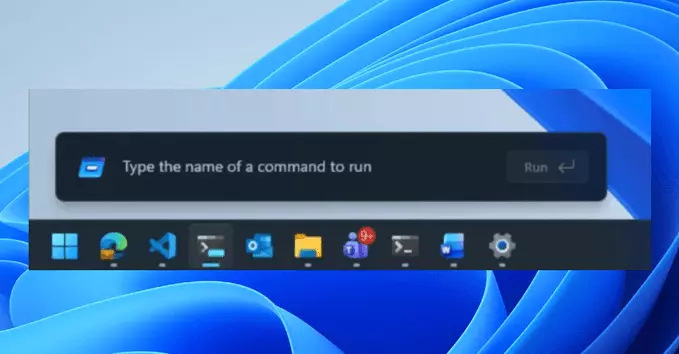
Microsoft is testing a fresh update for the Windows 11 Run menu, bringing a modern look, dark mode support, and other handy improvements. This article explains what's new, why it matters, and how it can make your daily tasks easier.
The Run menu is a quick tool to launch apps, open folders, or access system settings. You can open it by pressing Windows Key + R. It's a simple box where you type commands like notepad or cmd.
The current Run menu looks dated and doesn't match Windows 11's rounded corners and dark mode. The new design fixes this, making it feel more modern and consistent.
Microsoft is testing several changes in the latest Windows 11 Insider Preview build (Dev Channel). Here's a breakdown:
If you're a Windows Insider (Dev Channel), you can test it now. Go to Settings > Windows Update > Windows Insider Program and join the Dev Channel. After updating, press Windows Key + R to see the changes.
If you're not an Insider, don't worry. This update will likely roll out to everyone in a future Windows 11 feature update (like version 24H2 or later).
Dark mode reduces eye strain, especially at night. Many users prefer it for long work sessions. The new Run menu finally supports this, making your experience smoother and more comfortable.
Microsoft is also testing updates to the Taskbar, Start menu, and File Explorer. The Run menu redesign is part of a broader push to polish Windows 11 after its initial launch.
The redesigned Windows 11 Run menu with dark mode is a small but welcome change. It shows Microsoft is listening to user feedback and refining the system. Keep an eye on Windows Update for this feature to arrive on your PC.
Pro Tip: Use the Run menu to quickly open system tools like msconfig, regedit, or control panel. It's faster than searching through menus.










Comment