If you love the nostalgic look of old-school video games, you'll enjoy NeoCam. This indie app gives your iPhone photos a retro video game style, turning everyday shots into pixelated art that looks straight out of an 8-bit or 16-bit console. Whether you want to add a fun filter for social media or create unique wallpapers, NeoCam makes it easy.
What Is NeoCam?
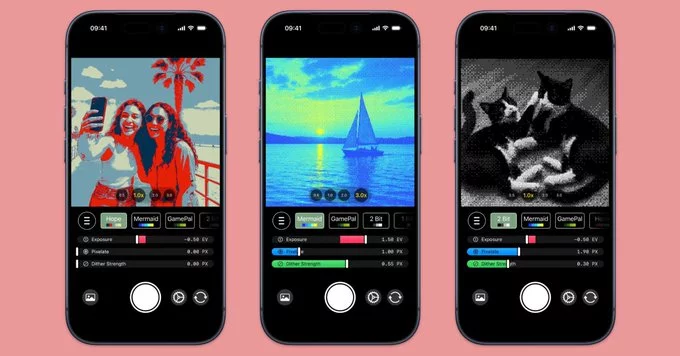
NeoCam is a camera and photo editing app designed specifically for iOS. It applies vintage video game effects to your images, mimicking the graphics of classic systems like the Nintendo Entertainment System (NES) or the Sega Genesis. The app uses advanced algorithms to convert your photos into pixel art while keeping the original composition clear.
Key Features of NeoCam
- Multiple retro styles – Choose from 8-bit, 16-bit, or even arcade-style filters.
- Real-time preview – See the retro effect before you snap the photo.
- Adjustable pixel size – Control how blocky or detailed the final image looks.
- Color palettes – Pick from classic game color schemes (e.g., Game Boy green, NES gray).
- No watermarks – Save or share your creations without branding.
- Simple interface – One tap to apply the effect, no complex settings.
How to Use NeoCam for the Best Results
To get the most out of NeoCam, follow these simple tips:
- Start with a well-lit photo – Clear lighting helps the app create clean pixel transitions.
- Experiment with different pixel sizes – Smaller pixels keep more detail; larger pixels give a stronger retro vibe.
- Use portraits or close-ups – Faces and objects with distinct shapes look amazing in pixel art.
- Try the color palette presets – Each console has its own iconic look, so test them all.
- Combine with other editing apps – You can apply NeoCam's filter to an image you already edited for a unique result.
Pros and Cons of NeoCam
What We Like
- Extremely easy to use – perfect for beginners.
- High-quality pixel conversion that doesn't ruin the original image.
- Free version available with basic filters; premium unlocks more styles and palettes.
- No internet required – works offline.
What Could Be Better
- Limited to iPhone only – no Android version yet.
- Some advanced options (like custom color palettes) are behind a paywall.
- Battery drain may be higher due to real-time processing.
Is NeoCam Worth Downloading?
If you enjoy retro gaming or want a fun, creative way to edit your iPhone photos, NeoCam is a solid choice. It brings a genuine retro video game style to your pictures without making them look messy. The app is free to try, and the premium upgrade is inexpensive. Whether you're posting on Instagram or just having fun with friends, NeoCam adds a unique twist to your photo collection.
Download NeoCam from the App Store today and start turning your memories into classic game moments.











Comment