Alerts

-
3 minutes, 15 seconds
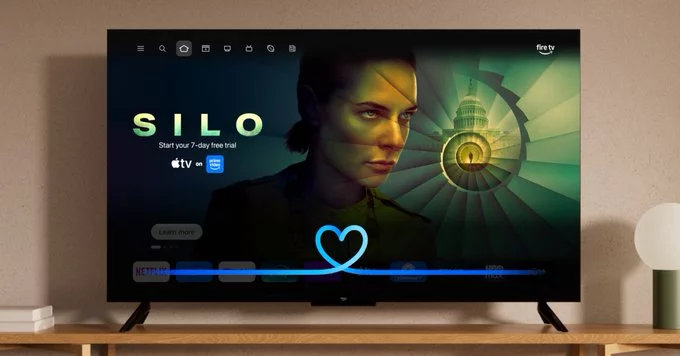
Amazon has announced that Alexa Plus is expanding to additional Fire TV devices, opening the door for more users to experience its advanced capabilities. The rollout builds on the initial launch, which was limited to a select set of hardware. With this expansion, a broader range of Fire TV streaming sticks, smart TVs, and soundbars will now support the conversational assistant, bringing its enhanced features to living rooms across the country.
This update means that users who previously missed out on the initial wave can now access Alexa Plus’s core functionality, including more natural, multi-turn conversations and personalized assistance. The expansion is part of Amazon’s ongoing effort to make its premium AI experience more widely available across its ecosystem. For a complete list of newly supported devices, Amazon points users to the official Fire TV support page. The company has indicated that this is just the next step, with further device compatibility expected in the coming months as the service continues to scale.
Alexa Plus on Fire TV introduces two powerful ways to control your entertainment. Instead of endlessly scrolling, you can now ask for tailored movie recommendations using natural language. For example, simply say, “Alexa, recommend a sci-fi movie for tonight,” and Alexa Plus will pull from available streaming services to suggest options that match your request.
Beyond recommendations, the assistant now supports precise scene jumping. If you want to skip to a specific moment, you can ask, “Alexa, jump to the scene where the car chase starts,” and it will navigate directly to that point in the movie or show. This feature is designed to save time and make revisiting favorite moments effortless. Both capabilities are built into the Alexa Plus experience, aiming to make Fire TV more conversational and responsive to your commands.
Eligible Fire TV users can begin using Alexa Plus by ensuring their device is updated to the latest Fire OS version. No additional hardware is required for supported models, but the feature does require an active Alexa Plus subscription (sold separately). To get started, open the Fire TV home screen and say, “Alexa, launch Alexa Plus,” or navigate to the Alexa settings menu under Settings > Alexa > Alexa Plus to confirm your subscription is linked.
If you haven’t subscribed yet, you can sign up directly on the device or via the Amazon Alexa app. After subscribing, you may need to restart your Fire TV once to activate the service. For the best experience, ensure your Fire TV is connected to a stable internet connection and that your Alexa account is the same one used for your subscription. Once active, Alexa Plus will automatically enhance responses with advanced features like movie recommendations and scene jumping, with no further setup required. If you encounter issues, check for system updates or visit Amazon’s Alexa Plus help page for troubleshooting.
Beyond the headline upgrades, Alexa Plus on Fire TV introduces several other quality-of-life improvements. Users can now enjoy more natural, conversational interactions when searching for content, and the assistant is better at understanding context across multiple requests. The update also brings enhanced sports scores and standings updates, delivered in a more concise and timely manner.
Looking ahead, Amazon has confirmed plans to expand Alexa Plus to additional Fire TV devices and compatible smart TVs in the coming months. This rollout will be gradual, with the company prioritizing newer hardware first before reaching older models. The goal is to bring the full suite of AI-powered features to as many living rooms as possible, ensuring a consistent and intelligent viewing experience across the entire Fire TV ecosystem. Stay tuned for specific device compatibility announcements as the rollout progresses.









Comment