
Alerts
-
3 minutes, 15 seconds
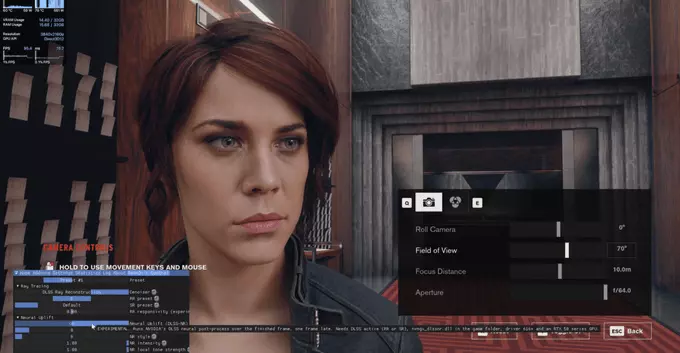
DLSS 5 is NVIDIA’s latest AI upscaling technology, designed to boost frame rates by rendering at a lower resolution and then using deep learning to reconstruct a high-quality image. Unlike previous versions, DLSS 5 introduces a new transformer-based model that improves temporal stability and reduces ghosting, making it a significant leap over DLSS 3.5.
However, because DLSS 5 is initially locked to the newest GeForce RTX 50-series GPUs, modders have stepped in. They have created an unofficial version by extracting the DLSS 5 DLL file from the latest NVIDIA drivers and repackaging it. This mod works by simply replacing the existing nvngx_dlss.dll file in a game’s directory. The mod forces the game to load the newer DLSS 5 code, even if the game was originally built for an older DLSS version. This allows players with older RTX cards to experience the benefits of the new AI model without upgrading their hardware.
The DLSS 5 mod has been successfully applied to a diverse range of titles, from older classics to recent releases. Confirmed games include Control, The Elder Scrolls V: Skyrim, and Grand Theft Auto V, among others. The mod’s compatibility is notably broad, functioning with both older and newer titles, which makes it a versatile tool for enhancing visual fidelity across different generations of gaming. Because the mod is built to work with the underlying rendering APIs, it can be injected into many games that originally shipped without DLSS support, or that have outdated DLSS versions. This means players can enjoy the benefits of DLSS 5’s improved upscaling and ray reconstruction in titles that were never officially updated, as well as apply it to the latest AAA releases for a performance boost. The community has already demonstrated its effectiveness in a variety of genres, from action-adventure to open-world RPGs, proving that the mod is not limited to a specific game engine or style.
First, download the mod package from a trusted community repository. After extracting the archive, locate your game’s installation folder. Navigate to the directory containing the executable file, then find the subfolder where the original DLSS file (typically named nvngx_dlss.dll) resides. Back up this original file before proceeding.
Replace it by copying the modded nvngx_dlss.dll file from the downloaded archive into that same folder, overwriting the existing one. Ensure the file name matches exactly—if the mod includes a version with a different suffix, rename it to the original file’s name.
Finally, launch the game and open its graphics or display settings. Enable DLSS from the upscaling options and select a quality preset (Quality, Balanced, or Performance). The mod should now be active, providing the enhanced upscaling and frame generation. If the option is greyed out, verify your GPU supports DLSS and that the game is running in fullscreen mode.
The most compelling reason to try the DLSS 5 mod is the substantial performance uplift it delivers. According to user reports and early benchmarks, many titles see up to 2x performance gains in frame rates, particularly when gaming at 4K resolution or with ray tracing enabled. This can transform demanding games from stuttery slideshows into smooth, highly playable experiences, often allowing players to max out graphical settings they previously had to dial back.
However, this boost in speed comes with a trade-off. Because the mod aggressively upscales the image, it can occasionally produce minor visual artifacts in certain scenes. You might notice shimmering on fine details like hair or foliage, or slight ghosting around moving objects. In most cases, these artifacts are fleeting and barely noticeable during fast-paced action, but they can become more apparent in slower, cinematic moments. The visual quality is generally very good, but it is not always pixel-perfect compared to native rendering.









Comment