
-
2 minutes, 2 seconds
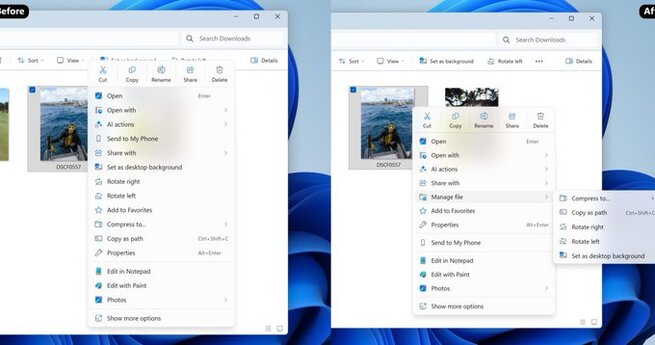
Windows 11 users can expect a snappier, cleaner File Explorer experience. Microsoft is speeding up and decluttering File Explorer in Windows 11 by introducing preloading to improve launch times and simplifying context menus to remove unnecessary clutter. These updates are especially useful for lower-powered PCs, tablets, and handheld devices, making file management faster and more intuitive.
The key improvement is preloading. File Explorer now runs background tasks that prepare it to open almost instantly when you launch it. On modern PCs, this might feel instantaneous already, but for older or less powerful devices, preloading can significantly reduce wait times. Users can also disable this feature if they prefer to save system resources.
Microsoft is redesigning the context menus in File Explorer to reduce unnecessary actions and empty space. By highlighting frequently used options and hiding less common ones, navigation becomes simpler and less overwhelming. This streamlining mirrors earlier updates Microsoft made to Office apps, where only essential features were emphasized for faster access.
Enabling preloading can make a noticeable difference on slower systems, ensuring that folders and files open almost immediately. On high-end PCs, the impact may be minimal, so it’s optional. Users can toggle this setting in Windows 11 Dev preview builds, balancing speed and background resource usage according to their needs.

2.6K articles

1.4K articles

34 articles

28 articles












Comment