Alerts

-
3 minutes, 47 seconds
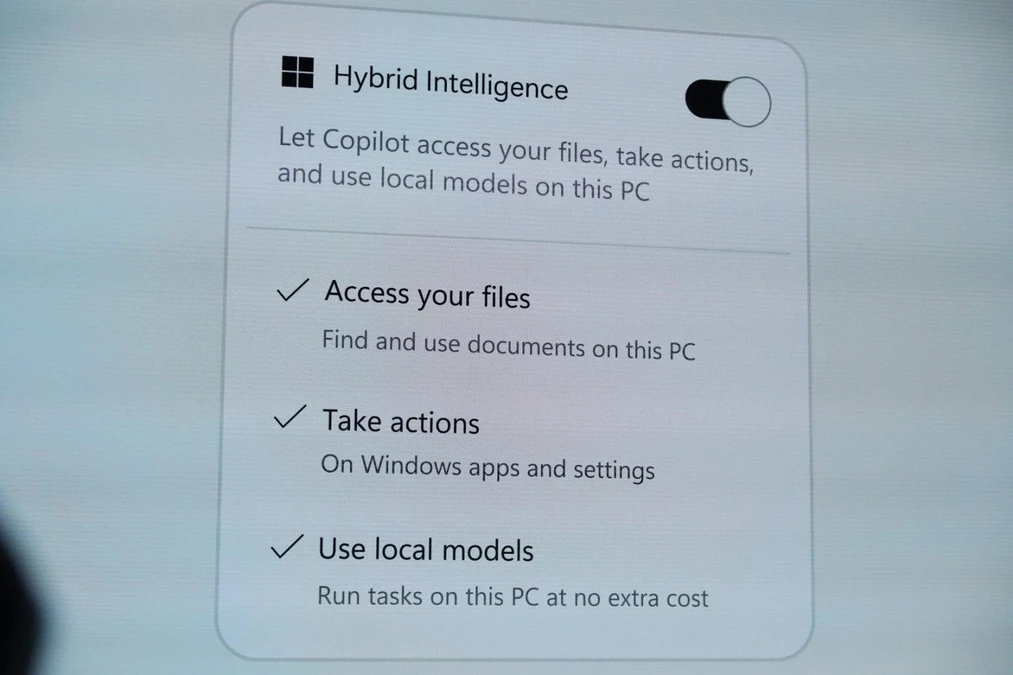
At a Windows and Surface event, Microsoft showed an upgrade to Copilot that gives the AI access to local files on a PC and lets it take actions across the operating system. The demonstration marked a move beyond answering questions: Copilot can work with files stored on the computer and carry out steps to complete a task.
Microsoft described the approach behind the upgrade as “Hybrid Intelligence,” a mix of local and cloud AI models that apps and tools can draw on to accomplish tasks efficiently. The idea was illustrated onstage by Jacob Andreou, Microsoft’s EVP of Copilot, in a video demonstration using the company’s Autopilot tool.
Andreou asked Autopilot for help filing taxes after receiving an email from his accountant. He told the agent to get the accountant what she needed. Autopilot then searched across different folders for the relevant documents, renamed the files, and zipped them into a folder. It also drafted an email to the accountant with the zipped folder attached. The example showed how Copilot’s access to local files and its ability to act across Windows could support a task that involves several steps.
Microsoft calls its approach “Hybrid Intelligence”: a way for apps and tools to rely on a mix of local and cloud AI models to accomplish tasks efficiently. The concept is part of an upgrade to Copilot that gives it access to files stored on a PC and the ability to take actions across Windows.
Rather than relying on only one kind of AI model, Hybrid Intelligence combines models that run locally with cloud-based models. Microsoft presented this as the approach behind Copilot’s new ability to work with files and carry out tasks across the operating system.
The company demonstrated the idea through Autopilot, its AI tool. In the demo, Microsoft’s EVP of Copilot, Jacob Andreou, asked the agent to help with filing taxes after receiving an email from his accountant. Autopilot searched across different folders for documents, renamed the files, zipped them into a folder, and drafted an email to the accountant with the zip file attached.
The example showed how Microsoft’s mix of local and cloud AI could support a task involving files and actions in Windows, rather than simply responding to a request with text.
Microsoft EVP of Copilot Jacob Andreou demonstrated Autopilot’s new capabilities with a tax-filing task. In a video walkthrough onstage, he told the tool he had received an email from his accountant and asked it to get her what she needed.
The request showed how Autopilot could help with work that involves both local files and actions across Windows. Rather than asking Andreou to locate and prepare each document himself, the agent searched across different folders for the relevant materials. It then renamed the files and gathered them into a zip folder.
Autopilot also drafted an email to the accountant with the zip file attached. The demo presented a series of steps flowing from a single request: find the documents, organize them, and prepare them to send. Microsoft described the process as an example of Hybrid Intelligence, combining local and cloud AI to accomplish tasks efficiently. The demonstration focused on helping Andreou respond to his accountant’s request for materials, without showing him manually sorting through folders or composing the message.
In the demo, Microsoft EVP of Copilot Jacob Andreou asked Autopilot to help with filing taxes. He told the agent that he had received an email from his accountant and asked it to get her what she needed. Autopilot then searched across different folders on the PC for the relevant documents.
After finding them, the agent renamed the files and zipped them into a folder. It also drafted an email to the accountant with the zip file attached. The sequence showed Autopilot carrying out several steps across local files and Windows in response to a single request, rather than only answering with information.
The demo focused on preparing the documents and composing the message; the source describes a draft email, not a sent one. The workflow illustrates how Copilot’s access to local files and ability to take actions across the operating system can be used for a practical task: gathering documents, organizing them, and getting an email ready for the accountant.








Comment