Alerts

-
3 minutes, 20 seconds
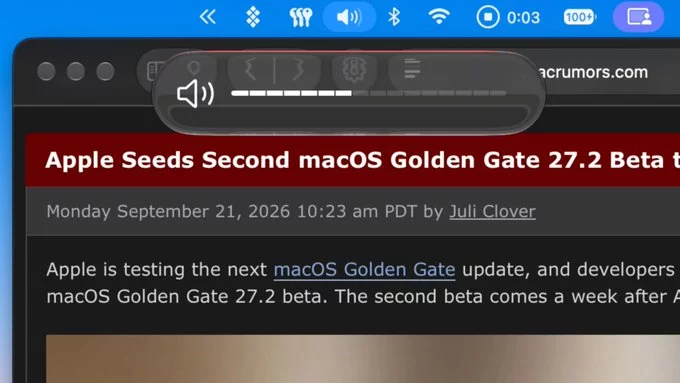
Apple has released the first developer beta of macOS 27.2, and the update's most visible change is a redesigned set of sliders for volume and screen brightness. The new controls replace the long-standing versions that Mac users have relied on for years, giving both the system volume and display brightness a fresh look that matches the direction Apple has taken with recent interface updates.
The headline change is the redesigned volume and brightness sliders, which now appear in the Control Center and in the on-screen overlay that shows up when you press the volume or brightness keys. According to early reports from developers who installed the beta, the sliders are larger, easier to grab with a cursor, and better suited to the rounded visual language Apple has been rolling out across its platforms.
Because this is a beta release, the final appearance and behavior of the sliders could still change before macOS 27.2 ships to the public. Developers can download the beta now through the usual channels, while everyone else will have to wait for the finished version.
The redesigned volume slider in the macOS 27.2 beta introduces a thicker track and a larger, more prominent knob. Apple says the new shape makes the control easier to grab and adjust precisely, particularly on trackpads and displays with high pixel densities.
The slider also gains a subtle bounce animation that plays as the knob reaches either end of the track, giving users tactile-feeling feedback without any haptic hardware. According to the beta release notes, the animation is intended to signal that the volume has hit its minimum or maximum level.
Functionally, the slider behaves as before: dragging it changes the system output volume, and the familiar mute behaviour still applies when the level reaches zero. The redesign is visual and interactive rather than a change to how audio levels are processed.
Apple has not yet confirmed whether the new slider will appear on all Macs or only on models with certain display technologies. The feature remains in beta, so its final behaviour could change before the public release.
The brightness control receives the same visual overhaul as its volume counterpart in the macOS 27.2 beta. Instead of the previous thin vertical bar, the slider now appears as a thicker, rounded track that is easier to grab with a cursor or trackpad gesture.
Functionally, the brightness slider continues to adjust display luminance in the same increments as before. The redesign is cosmetic, aimed at making the control feel more consistent with the rest of the system's updated interface language. Users who rely on keyboard shortcuts for brightness adjustments will notice no change in behaviour.
One detail worth noting is that the new slider design appears in the Control Center and in the menu bar brightness popover. The beta does not introduce any new brightness-related features, such as automatic scheduling or per-app brightness settings. It is purely a visual refresh.
As with the volume slider, the brightness redesign is available to developers and public beta testers running macOS 27.2. Final release timing has not been announced.
For anyone running the macOS 27.2 beta, the redesigned sliders are a small but welcome quality-of-life change. The new volume slider and brightness slider replace the older controls with a cleaner, more modern look that fits the rest of the interface.
Here is what you can expect from the update:
If you are not enrolled in the beta program, you will need to wait until Apple releases the update to all users. Until then, the sliders remain unchanged on stable versions of macOS.










Comment