
Alerts
-
2 minutes, 58 seconds
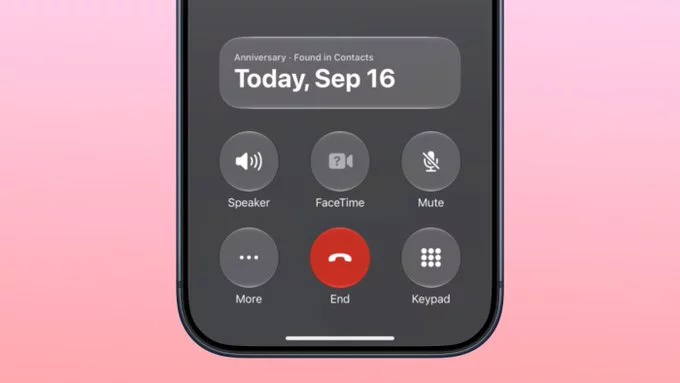
Apple released the iOS 27.2 beta today, and it includes a small feature that could save you from an awkward phone call. The update adds a reminder that it's your anniversary when you call someone, as long as you've added the date in the Contacts app.
On the date of your anniversary, when you go to call that person, you'll see a reminder that it's an important day so you don't forget to say something. The anniversary alert uses Call Context, a feature Apple added in iOS 27.
Call Context already works with birthdays, and it shows a fireworks animation when you're placing a call. iOS 27.2 adds anniversaries to the mix, but unfortunately, it doesn't come with a new animation.
For anyone who has ever blanked on a milestone mid-dial, the reminder arrives right when it matters most. Just make sure the date is saved in Contacts first.
The anniversary alert leans on Call Context, a feature Apple added in iOS 27. Call Context brings up information from emails and other sources when you place a phone call. If you call an airline and you have an email with a flight confirmation number for that airline in the Mail app, it surfaces that confirmation number so you don't have to go digging for it.
In iOS 27, Call Context works with birthdays, and it shows a fireworks animation when you're placing a call. iOS 27.2 adds anniversaries, but unfortunately, it doesn't come with a new animation.
So when you go to call the person on the date of your anniversary, you'll see a reminder that it's an important day, helping you avoid forgetting to say something.
The anniversary reminder draws its information directly from the Contacts app, so the date has to live on the person's contact card before Call Context can surface it. Fortunately, adding it takes only a few taps.
Open the Contacts app and select the name of the person whose anniversary you want to save. Tap Edit in the corner of the screen. Next, tap add date. The first suggestion that appears under the date field is anniversary, so choose that option and enter the date.
Once the anniversary is saved to the contact card, it becomes available to the Call Context feature in iOS 27. From then on, when the date comes around and you go to call that person, the reminder appears so you don't forget to say something. It is a small bit of setup, but it means the alert will be waiting for you on the day itself.
If tapping through the Contacts app feels like too much effort, there is a faster route. You can also ask Siri AI to add the anniversary date to the person's contact card, provided you have a device that supports Apple Intelligence.
That means you don't have to open Contacts, select the person's name, tap "Edit," and then tap "add date" to reach the anniversary suggestion. Instead, a single spoken request handles the job, and the date lands on the right contact card.
This matters because the iOS 27.2 anniversary reminder depends entirely on the date being stored in Contacts. The Call Context feature draws from the Contacts app, so a missing date means no alert when you place your call. Once Siri AI has saved the anniversary, the reminder is ready to appear on the important day.








Comment