Alerts

-
2 minutes, 56 seconds
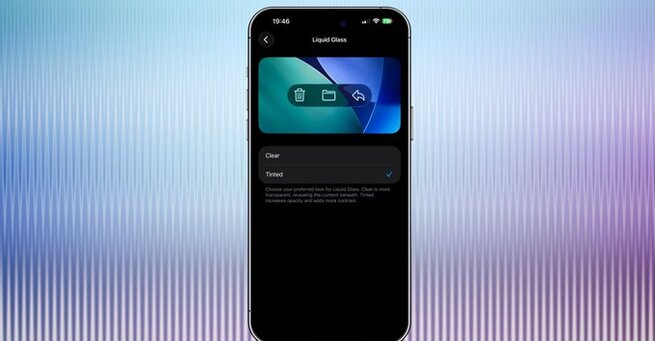
Apple has officially rolled out iOS 26.1, and users can now tweak Liquid Glass — the signature translucent design introduced in iOS 26. This update gives iPhone owners more control over visual clarity by adding a new transparency toggle that adjusts opacity levels across menus, buttons, and tabs. It’s a small but highly requested change that improves legibility for users who found the previous design too glassy or distracting.
The new update also enhances day-to-day usability with refined Apple Music swipe gestures, customizable Camera lock screen controls, and Live Translation upgrades supporting more languages.
To tweak Liquid Glass on your iPhone, head to Settings > Display & Brightness > Liquid Glass. You’ll now see two design options: the original translucent style and a new frosted glass look with higher contrast. The latter helps improve text visibility, making navigation easier in bright environments.
This feature continues Apple’s trend of blending aesthetics with accessibility, giving users a chance to tailor their device’s visual depth to their preferences — something many have requested since iOS 26’s debut.
Beyond the Liquid Glass update, iOS 26.1 introduces several quality-of-life improvements:
Apple Music mini player swipes: Skip tracks forward or back with a simple swipe.
Camera lock screen controls: You can now disable the quick swipe gesture to prevent accidental photo launches.
Live Translation updates: AirPods users can now translate conversations in Italian, Mandarin, Japanese, and Korean seamlessly.
These refinements, though subtle, make iOS 26.1 one of the most balanced and polished releases of the year.
If you value customization and smoother multitasking, updating to iOS 26.1 is absolutely worth it. The Liquid Glass tweak alone addresses one of the biggest complaints about iOS 26’s design — giving users better visibility without losing Apple’s elegant aesthetic.
Apple continues to demonstrate its responsiveness to feedback, and this update is proof that even small interface adjustments can greatly enhance the user experience.










Comment