Profile
Instagram has once again taken a page from Snapchat’s playbook with its new disappearing Instants photos...
Instagram Copies Snapchat Again: New Disappearing Instants Photos Explained
May 14 -
2 minutes, 6 seconds
Instagram’s Latest Move: Disappearing Instants Photos
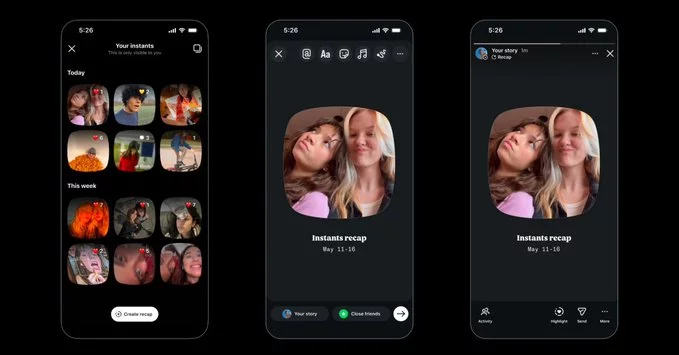
Instagram has once again taken a page from Snapchat’s playbook with its new disappearing Instants photos feature. This update lets users share photos that vanish after being viewed, similar to Snapchat’s Stories. The feature aims to boost engagement by encouraging more spontaneous, temporary sharing without cluttering your profile.
What Are Instants Photos?
Instants are temporary photos that disappear after the recipient views them once. You can send them directly to friends or post them to your close friends list. Unlike regular posts, they don’t stay on your feed or profile. This makes them perfect for quick updates, funny moments, or private messages you don’t want to last forever.
How to Use Instagram’s New Disappearing Feature
- Send a Disappearing Photo: Open a direct message, tap the camera icon, and take a photo. Before sending, tap the “one-time view” button (it looks like a circle with a “1”). The photo will vanish after the recipient opens it.
- Post to Close Friends: When creating a story, select “Close Friends” and enable the “Disappearing” option. Your close friends can view the Instants photo, and it disappears after they close it.
- No Screenshot Notifications: Unlike Snapchat, Instagram does not notify the sender if someone takes a screenshot of a disappearing photo. Keep this in mind for privacy.
Why Instagram Keeps Copying Snapchat
Instagram’s strategy is simple: Snapchat pioneered ephemeral content (content that disappears), and users love it. By adding disappearing photos, Instagram keeps users on its platform longer and reduces the pressure to post perfect, permanent content. This feature also competes directly with Snapchat’s core offering, making Instagram a one-stop app for both permanent and temporary sharing.
Tips for Using Instants Photos Effectively
- Stay Casual: Use Instants for unfiltered, in-the-moment updates. Don’t overthink the content—just share what’s happening.
- Protect Privacy: Since screenshots aren’t flagged, avoid sharing sensitive information like passwords or private addresses.
- Engage Friends: Send Instants to close friends for inside jokes or quick check-ins. It feels more personal than a public story.
Instagram’s new disappearing Instants photos feature is a smart move to stay competitive. It gives users more control over their content and encourages authentic sharing. Whether you love or hate the Snapchat copycat trend, this update is here to stay. Try it out and see how it changes the way you communicate on Instagram.
Related Posts
Contact Information
Suggested Writers
-
2.4K articles
-
1.3K articles
-
34 articles
-
28 articles


Comment