Alerts

-
3 minutes, 47 seconds
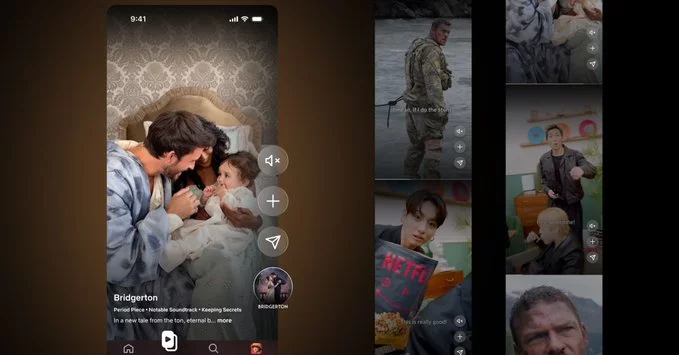
Netflix’s new vertical video feed is a mobile-first feature that lets you scroll through short, full-screen video clips just like on TikTok or Instagram Reels. This new design focuses on quick, engaging previews of shows and movies, making it easier to discover content on your phone.
The feed takes up your entire phone screen. You swipe up or down to move between clips. Each video is short—usually 30 to 60 seconds—and highlights a funny scene, dramatic moment, or action sequence from a Netflix title.
Netflix uses its recommendation algorithm to show you clips from shows and movies you might like. If you watch a lot of comedies, you’ll see funny clips. If you love thrillers, expect suspenseful teasers.
While watching a clip, you can tap a button to add the full show or movie to your “My List.” This makes it simple to save content for later without leaving the feed.
Each clip has buttons for liking, sharing, and getting more details. You can also tap to start watching the full title immediately.
Unlike TikTok or Instagram, Netflix’s vertical feed is not about user-generated content. Every clip comes from Netflix’s own library of movies and TV shows. This means you only see professional, high-quality previews. There are no ads or creator videos.
Netflix wants to make it faster and more fun to find something to watch. Many people spend minutes scrolling through rows of thumbnails. The vertical feed gives you a quick, visual taste of content, helping you decide in seconds.
No, the vertical feed is an optional feature. You can still browse using the traditional grid and categories. It’s simply a new way to explore content, especially if you enjoy short-form video.
Netflix’s vertical video feed is a smart update for mobile users. It makes content discovery faster and more engaging. If you haven’t tried it yet, open the Netflix app on your phone and look for the vertical feed icon. Swipe, watch, and find your next favorite show in seconds.









Comment