
-
4 minutes, 50 seconds
Google is officially retiring Gmailify, its service that let users bring Gmail features to non-Gmail accounts. Launched in February 2016, Gmailify allowed Yahoo, AOL, and Outlook/Hotmail users to enjoy Gmail’s spam protection, inbox organization, and enhanced search without changing their email address. Mobile users also benefited from improved notifications and streamlined inbox management.
Starting January 2026, Google will begin alerting users that Gmailify is no longer available. For those who relied on the service, this change means certain Gmail-specific features will disappear for their third-party email accounts.
Gmailify was designed to bridge the gap between Gmail and other email providers. By linking a third-party account to Gmail:
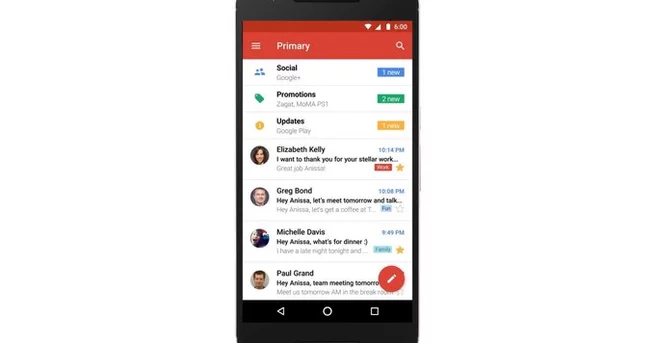
Emails were automatically sorted into Gmail’s familiar tabs like Social, Updates, and Promotions.
Advanced spam detection filtered unwanted messages more efficiently.
Mobile notifications became more reliable, reducing missed emails.
This made it easy for users to keep their existing email addresses while benefiting from Gmail’s organizational tools. For nearly a decade, Gmailify provided a seamless way to unify multiple email services under Gmail’s interface.
Along with Gmailify, Google is also ending support for “Check mail from other accounts” via POP (Post Office Protocol). POP allowed users to fetch emails from third-party accounts into Gmail but lacked many modern features.
Google encourages users to switch to IMAP on mobile devices for continued access to Outlook, Yahoo, and other accounts. While IMAP lets you view emails, it won’t include Gmailify’s advanced tools like tabbed inbox organization or improved spam filtering.
For users who want emails from other accounts to appear in Gmail automatically, Google recommends setting up automatic forwarding on the web. This method forwards new messages from your third-party provider directly to Gmail. Each provider has specific instructions for setting up forwarding, so checking their support documentation is necessary.
Although forwarding lacks some of Gmailify’s advanced features, it ensures that all incoming emails arrive in your Gmail inbox without having to log in separately. Users can continue reading, replying, and organizing messages from one central location, preserving workflow efficiency.
Emails previously imported using Gmailify will remain in your Gmail account, so users won’t lose past messages. The change primarily affects new messages and features like tabbed categorization and improved spam detection. Users who heavily relied on Gmailify’s integrations may need to adjust their workflow or explore third-party email management apps for similar functionality.
Google’s retirement of Gmailify is part of a broader effort to simplify Gmail’s email ecosystem. Users should:
Check for Gmailify notifications in their app.
Set up IMAP on mobile devices for continued access to third-party accounts.
Configure automatic forwarding if they want new emails to appear directly in Gmail.
These steps ensure a smoother transition and prevent disruption to daily email routines. While Gmailify’s decade-long run is ending, Gmail’s core tools continue to offer robust email management for both Gmail and external accounts.
Gmailify’s shutdown marks the end of a unique experiment that combined Gmail’s power with third-party email addresses. Users now need to adjust to POP deprecation and explore alternatives like IMAP and automatic forwarding. By taking proactive steps, managing multiple email accounts in Gmail remains straightforward—even without Gmailify.

2.5K articles

1.3K articles

34 articles

28 articles














Comment