Alerts

-
5 minutes, 1 second
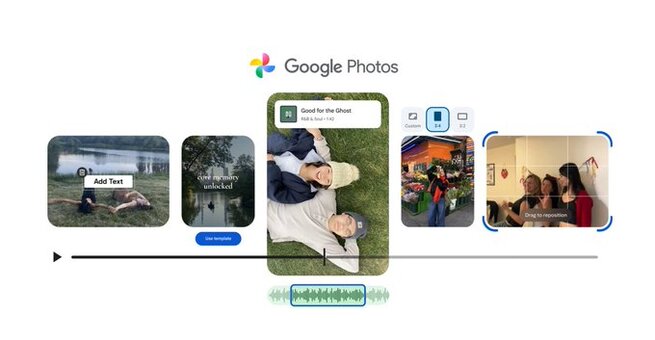
Google Photos’ new video editor is rolling out with highlight reel templates, custom text tools, and a redesigned timeline—answering one of the most common user queries: “Can Google Photos edit videos like CapCut?” In this update, Google pushes the app closer to full-fledged mobile editing, giving Android and iOS users more creative control without needing third-party apps. This shift also signals Google’s growing focus on short-form video features, an area where creators want fast, simple tools that produce polished clips for sharing.
One of the standout additions is the new set of highlight reel templates, which instantly sync your photos and videos to pre-made themes. These stylized templates include built-in music and text overlays, making them feel noticeably more polished than the older version. Previously, highlight reels were basic mashups with few customization options, but now Google includes dynamic transitions and auto-timed effects. The upgrade clearly aims at users who love quick edits for Instagram Reels, YouTube Shorts, and TikTok.
With this update, highlight reels in Google Photos now intelligently time your clips to match the template’s pacing. That means fewer manual adjustments and a faster editing workflow, especially for users who want social-ready videos in minutes. Because the new system syncs music and text automatically, the editor produces surprisingly cohesive results even without hands-on fine-tuning. These upgraded highlight reel features and text overlays are launching first on Android before expanding later.
Beyond templates, Google Photos now includes a completely redesigned video editor with a cleaner layout and streamlined controls. The centerpiece of the update is a new universal timeline, which lets users trim, reorder, and manage clips in a way that feels noticeably closer to TikTok’s CapCut editor. This refreshed interface is built to reduce the number of taps required for common editing tasks, improving overall speed and usability on both Android and iOS.
The universal timeline gives the Google Photos video editor a more professional yet accessible feel, especially for beginners. Drag-and-drop clip management, clearer markers, and bigger edit handles make adjustments less frustrating than in previous versions. Creators familiar with CapCut or Instagram’s built-in editor will notice similar workflow cues, signaling Google’s desire to compete directly in the short-video editing space. It’s a meaningful shift for an app long known more for storage than creativity.
Google also introduced a reworked interface for browsing music right inside the app. Instead of digging through menus, users now get a smoother selection process with grouped categories, suggested tracks, and faster previews. Custom text overlays can be added directly to videos with new font styles and placement controls, giving users more flexibility for storytelling or adding callouts. This upgrade makes it easier to enhance clips without needing another editing app.
The newly improved Google Photos video editor and the enhanced text tools are available starting today, with the full highlight reel template rollout continuing over the next few weeks. While Android users get the first look at some of the most advanced features, both platforms will benefit from the broader design refresh. For anyone looking to create cleaner, more dynamic videos without switching apps, this update marks one of the biggest creative upgrades Google Photos has delivered in years.









Comment