Alerts

-
5 minutes, 27 seconds
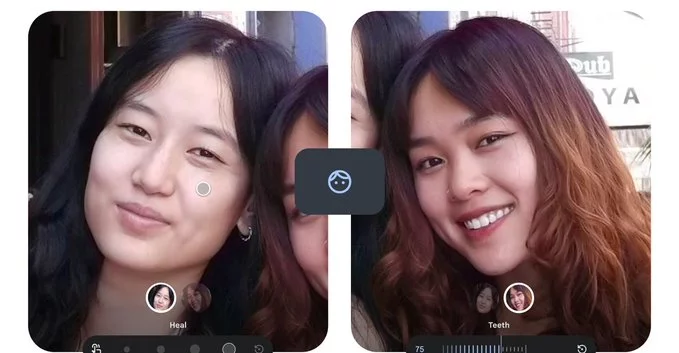
Looking for a quick way to improve selfies without over-editing? Google Photos has introduced updated face touch-up tools that let users refine photos with more control and subtlety. The new features focus on natural-looking results, allowing you to adjust how much blemish removal, eye brightening, and teeth whitening is applied. This update answers a common user need: enhancing photos without making them look artificial or overprocessed.
One of the biggest improvements is the ability to fine-tune editing intensity. Instead of a one-tap filter that applies a fixed effect, users can now adjust sliders to control how strong each enhancement appears. This makes a noticeable difference, especially for portraits where over-editing can ruin authenticity. Subtle edits help maintain natural skin texture while still improving overall appearance.
The updated tools are particularly useful for users who want professional-looking results without advanced editing skills. Everything remains simple and accessible within the app’s interface. By giving users control, Google Photos bridges the gap between automatic editing and manual precision.
Photo editing apps often struggle with balancing enhancement and realism. Too much smoothing can remove important details, while aggressive whitening can look unnatural. Google Photos addresses this by focusing on gradual adjustments rather than dramatic transformations.
The refined blemish removal tool, for example, reduces imperfections without completely erasing skin texture. Eye brightening enhances clarity without making eyes appear overly sharp or artificial. Teeth whitening is also toned down to avoid unrealistic brightness levels. These changes align with a growing trend toward authenticity in digital images.
Social media users are becoming more aware of overly edited photos, and preferences are shifting toward realistic visuals. Subtle editing tools cater to this demand by enhancing photos in a way that feels genuine. This is especially important for personal branding, professional profiles, and everyday sharing.
With these updates, Google Photos positions itself as a practical solution for users who want quick edits that still look believable. The focus is not on dramatic makeovers but on small improvements that elevate the overall quality of an image.
Ease of use remains a key strength of Google Photos. The new tools are integrated seamlessly into the existing editing workflow, so users don’t need to learn anything new. Sliders are intuitive, and changes can be previewed in real time, making it easy to experiment without committing to edits.
This approach makes the feature accessible to a wide audience, from casual users to content creators. Whether you’re editing a selfie, a group photo, or a professional headshot, the tools adapt to different needs without overwhelming the user.
The update reflects a broader shift in mobile photography toward smarter, user-friendly enhancements. Instead of relying on heavy filters, apps are now focusing on precision and customization. Google Photos’ new face tools are a clear example of this evolution.
As smartphone cameras continue to improve, editing tools must also evolve to match user expectations. Subtle adjustments, real-time previews, and intuitive controls are becoming standard features. Google Photos is keeping pace by delivering tools that enhance images without compromising their authenticity.
For everyday users, the update means better-looking photos with less effort. You no longer need third-party apps to achieve polished results. Everything can be done within Google Photos, saving time and simplifying the editing process.
For creators and professionals, the added control opens up new possibilities for refining images quickly while maintaining a natural aesthetic. It’s a small update, but one that significantly improves the overall editing experience.
Google Photos continues to evolve as a powerful yet accessible editing platform. By focusing on subtle, adjustable enhancements, it delivers exactly what modern users want: better photos that still look real.










Comment