Alerts

-
3 minutes, 0 seconds
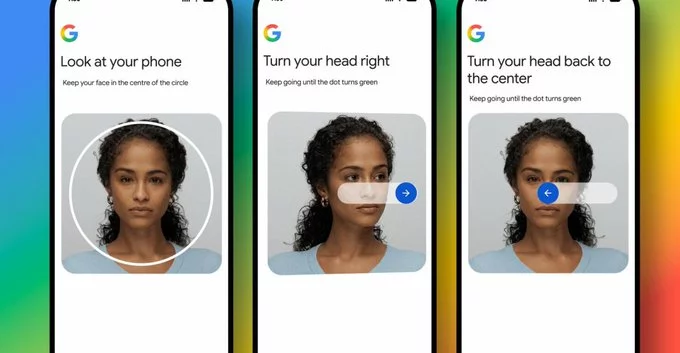
Google now lets you sign in to your account using a selfie video, marking a major shift toward password-free authentication. Instead of typing a password or using a fingerprint, you can simply record a short video of your face to prove it's really you. This feature, part of Google's broader push for biometric security, aims to make logging in faster, safer, and more convenient.
When you choose the selfie video option, Google's system asks you to look at your camera and record a brief video. The technology analyzes your facial movements and features to confirm your identity. It's not just a static photo—it's a liveness detection method that prevents someone from using a picture or pre-recorded video to trick the system.
Passwords are notoriously weak. People reuse them, forget them, or fall for phishing scams. A selfie video eliminates these risks because your face is unique and hard to fake. Here are the key benefits:
You might wonder: Is Google storing my video forever? Google says the video is processed on your device and not stored on its servers. The facial data is converted into a mathematical template, which is encrypted and kept private. You can also delete this template anytime from your account settings.
However, no system is perfect. If someone forces you to look at your phone, they could bypass the lock. For this reason, Google recommends using selfie video sign-in as a second factor (2FA) rather than your only protection.
Currently, Google's selfie video sign-in is rolling out to users with compatible devices (Android and iOS phones with front-facing cameras). It's available in select countries first, but Google plans to expand globally. You'll need to have 2-Step Verification enabled to access it.
Google's move is part of a larger trend called passwordless authentication. Other companies like Apple (Face ID) and Microsoft (Windows Hello) already use facial recognition. Selfie video sign-in takes this a step further by adding motion detection, making it even harder to spoof. Expect more services to adopt similar methods soon.
In short, signing in with a selfie video is convenient, secure, and easy to set up. While it won't replace passwords overnight, it's a big step toward a world where you never have to remember another password again.










Comment