Alerts

-
4 minutes, 50 seconds
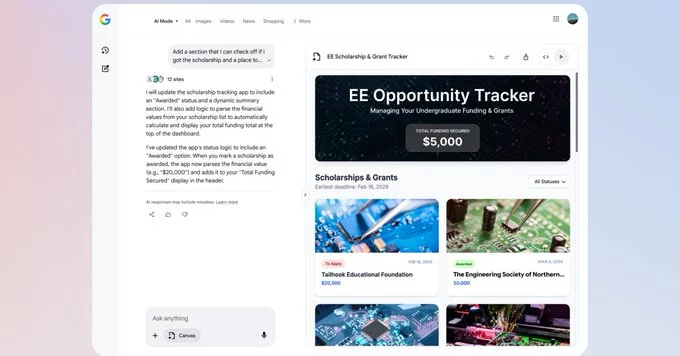
Google is expanding its AI-powered Canvas feature to more users across the US, now supporting creative writing, coding, and more. Many users have asked how they can turn Search into a personal workspace, and this update answers that question. Canvas in AI Mode integrates seamlessly with Search, allowing users to draft documents, develop tools, and organize information with real-time AI assistance.
Originally, Canvas debuted within Google’s Gemini app to create documents and code collaboratively. Its move into AI Mode began with visualizing travel plans, but Google is now opening the feature to handle broader tasks. Users can explore AI-generated dashboards, interactive prototypes, and structured layouts, all designed to help turn ideas into actionable outputs.
Getting started with Canvas is straightforward. Users can navigate to AI Mode within Google Search, tap the “plus” button in the chat window, and select Canvas. From there, you simply describe what you want to create, and Google displays results in a dedicated panel on the right side of your screen.
Currently, the feature is available only in English, but Google’s plan is to expand accessibility over time. This AI workspace merges Search’s up-to-date information with generative AI tools, allowing users to experiment, iterate, and refine ideas without switching between apps.
Canvas in AI Mode now offers robust support for creative writing. Whether drafting essays, scripts, or brainstorming ideas, the AI can generate structured content, provide suggestions, and even create outlines. Users no longer need separate tools for ideation and execution, as Canvas acts as a centralized hub for writing projects.
This integration also enables writers to see AI-generated examples alongside their own work, helping refine tone, style, and structure in real-time. For students, professionals, or hobbyists, Canvas makes tackling large writing tasks less intimidating and more interactive.
Programmers gain a powerful advantage with Canvas in AI Mode. The workspace now supports coding tasks, offering interactive prototypes and real-time code suggestions. Users can experiment with scripts, debug snippets, and visualize their projects without leaving the Search interface.
By combining Search’s latest data with generative AI, Google Canvas reduces the friction between coding research and implementation. Developers can quickly prototype ideas, test algorithms, or even generate templates for larger projects, streamlining workflows across multiple disciplines.
This expansion reflects Google’s commitment to making AI tools more practical and accessible. Instead of limiting Canvas to a niche audience or a single type of task, Google is positioning it as a versatile workspace. By supporting both creative writing and coding, Canvas caters to students, professionals, hobbyists, and creators alike.
The interactive AI workspace encourages experimentation and boosts productivity. Users can leverage real-time Search data, create prototypes, draft documents, or simply explore ideas, all within a unified panel. For many, this represents the next step in turning Search from an information tool into an active workspace.
While Canvas in AI Mode is currently US-only and English-focused, the potential for global expansion is significant. Google could eventually broaden accessibility to more languages and regions, making its AI-powered workspace a standard part of digital productivity.
As AI continues to reshape how we interact with Search and digital tools, features like Canvas highlight the shift toward integrated, multi-functional platforms. For users curious about exploring creative or technical projects, Canvas provides a practical, engaging, and highly interactive solution.









Comment