Gemini Photo Editing: Draw Your Way to Perfect AI Edits
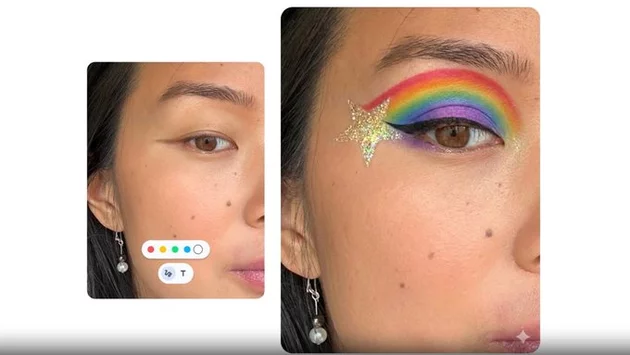
Google is revolutionizing how we interact with AI by testing a new Gemini drawing tool that allows users to circle or highlight specific parts of an image for precise editing. Available on both the Android app and Chrome web version, this feature eliminates the guesswork often associated with AI prompts by letting you point directly to what you want changed. Whether you are circling a person to ask for details or marking a sky to add a flying bird, this markup interface ensures Gemini understands your intent with surgical precision.
Precision Control with the New Gemini Drawing Tool
The core of this update is a manual markup interface that appears the moment you attach a photo to a Gemini prompt. Instead of relying solely on complex text descriptions, you can now use your finger or a stylus to encircle objects or jot down notes directly on the image. This "visual whispering" solves a long-standing frustration where AI models struggle to identify which specific part of a crowded photo a user is referencing. By combining manual sketching with powerful multimodal AI, Google is making photo manipulation feel more like a collaborative art session than a technical task.
Why Visual Markup Changes Everything for AI Prompts
This feature isn't just about aesthetics; it’s about improving the Gemini photo editing workflow for everyday users who aren't "prompt engineers." For instance, if you have a photo of a busy street and want to know the brand of a specific bicycle, you can simply circle it rather than describing its color, position, and model. The same applies to generative edits: by encircling a blank space in a landscape and typing "add a mountain range," you give the AI a clear boundary to work within. This level of guided input significantly reduces the "hallucinations" or errors common in fully automated AI image processing.
Building on the Power of Nano Banana Pro
The introduction of these markup tools is a natural evolution following the launch of Google's Nano Banana Pro model and recent conversational editing features in Google Photos. While previous updates focused on the AI’s internal logic, this change prioritizes the user's manual input, bridging the gap between human creativity and machine execution. It represents a shift toward "human-in-the-loop" AI, where the software provides the muscle but the user provides the specific direction. This synergy is what makes the 2025 suite of Google AI tools feel more intuitive and reliable than previous iterations.
How to Access the Gemini Image Markup Feature
Currently, the drawing tool is rolling out as part of a limited test within version 16.49.59 of the Google app. While many users are already seeing the markup icon when uploading images, the rollout is being handled in phases, meaning it may take a few weeks to reach all global accounts. If you have the update, you will see a small pencil or "edit" icon on your image thumbnail after attaching it to a chat. This feature works seamlessly across mobile and desktop, ensuring that whether you are on a phone or a laptop, your editing precision remains consistent.






Comment