
-
2 minutes, 41 seconds
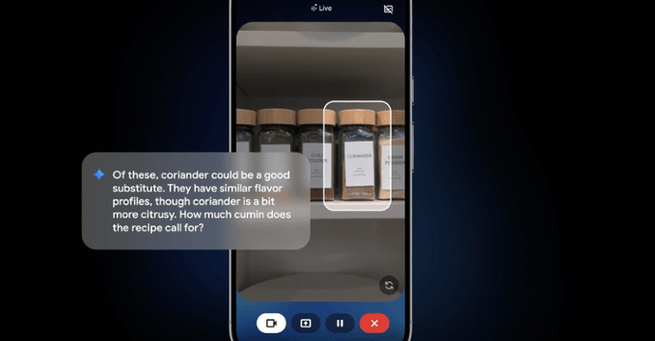
Gemini Live AI assistant is getting major updates that make it smarter, more interactive, and more useful in daily life. Starting next week, the assistant will not only talk with you in real time but also highlight objects on your screen through your camera. This means Gemini Live can now visually guide you by pointing out items in front of you, making it easier to follow instructions or find exactly what you’re looking for.
The biggest new feature coming to Gemini Live is visual guidance. With this update, you can point your phone’s camera at a group of items, and Gemini Live will highlight the correct one directly on your screen. For example, if you’re unsure which tool to use, the AI assistant can place a box around the right choice. This update will first appear on Pixel 10 devices launching August 28, before rolling out to other Android smartphones and iOS in the following weeks.
Beyond visual highlighting, Gemini Live is also getting deeper integration with core apps like Messages, Phone, and Clock. This means you’ll soon be able to use natural voice commands to not only get information but also perform actions across your device. For instance, while checking directions, you can ask Gemini Live to text someone that you’re running late, and it will draft and send the message without interrupting your flow.
These updates show how AI assistants are moving beyond simple conversation toward becoming full digital companions. By combining visual recognition with app integration, Gemini Live helps reduce friction in everyday tasks. Whether you’re navigating, sending quick updates, or identifying items in front of you, the AI assistant is designed to save time and improve efficiency.

2.5K articles

1.4K articles

34 articles

28 articles













Comment