Gemini AI App on Mac: A New Era for Desktop AI
Looking for how to use Gemini AI on Mac or what makes it different? Google has officially launched its Gemini AI app for macOS, giving users instant desktop access to its powerful AI assistant. The app allows you to interact with Gemini from anywhere on your screen and even share windows directly for smarter assistance. This move signals a deeper push into everyday productivity tools, making AI more integrated, responsive, and useful across workflows.
Seamless Access Anywhere on Your Desktop
One of the standout features of the Gemini AI app on Mac is its always-available interface. Instead of switching tabs or opening a browser, users can summon Gemini instantly from any screen. This reduces friction and keeps workflows uninterrupted, which is especially valuable for multitasking professionals and students.
The app is designed with simplicity in mind. A lightweight interface ensures it doesn’t clutter your workspace, while still offering full functionality. Whether you’re writing, coding, researching, or organizing tasks, Gemini stays accessible without being intrusive. This kind of integration reflects a broader trend toward AI becoming a natural extension of the operating system rather than a separate tool.
Window Sharing Brings Context-Aware Assistance
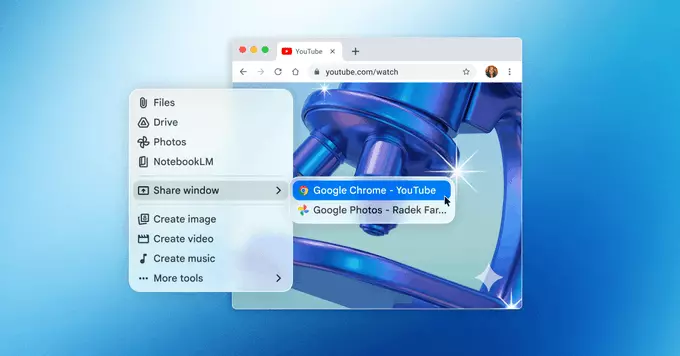
A key upgrade in the Gemini AI app is the ability to share specific windows directly with the assistant. This feature allows Gemini to better understand what you’re working on and provide more accurate, context-driven responses. Instead of manually explaining your task, you can simply show it.
For example, users can share a document, spreadsheet, or browser window and ask for summaries, edits, or insights. This makes collaboration with AI feel more intuitive and less time-consuming. It also reduces the gap between human intent and AI output, which has been a challenge in earlier tools.
Productivity Gains for Everyday Users
The launch of Gemini AI on Mac is not just about convenience—it’s about efficiency. By embedding AI directly into the desktop environment, Google is aiming to streamline everyday tasks. From drafting emails to analyzing data, users can complete actions faster without jumping between apps.
Students can use Gemini to summarize notes or explain complex topics, while professionals can generate reports, brainstorm ideas, or refine presentations. The ability to stay within one workspace while leveraging AI support can significantly improve productivity over time. It’s a practical upgrade rather than just a flashy feature.
Designed for the Future of Work
This release reflects how AI is evolving beyond chatbots into fully integrated assistants. The Gemini AI app aligns with a growing demand for tools that adapt to user behavior and context. By offering desktop-level access and smarter interactions, it positions itself as a daily companion rather than an occasional helper.
Security and control also remain important. Users can choose what to share and when, ensuring that sensitive information stays protected. This balance between functionality and privacy is crucial as AI tools become more deeply embedded in personal and professional workflows.
What This Means for Mac Users
For Mac users, the arrival of Gemini AI marks a significant shift in how tasks can be managed. Instead of relying solely on traditional apps, users now have an intelligent assistant that works alongside them in real time. This creates opportunities for faster decision-making, improved creativity, and better organization.
The integration also hints at future updates where AI could become even more deeply tied to system-level features. As AI continues to evolve, tools like Gemini are likely to play a central role in shaping how people interact with technology on a daily basis.
A Competitive Step in the AI Race
With the launch of Gemini AI on Mac, Google is clearly strengthening its position in the competitive AI landscape. By focusing on usability and real-world applications, the company is making AI more approachable and practical for a wider audience.
This move isn’t just about adding another app—it’s about redefining how users engage with their devices. As desktop AI becomes more common, the emphasis will shift toward seamless integration and meaningful assistance. Gemini’s Mac debut is a strong step in that direction, offering a glimpse into a smarter, more connected future of computing.











Comment