Alerts

-
2 minutes, 2 seconds
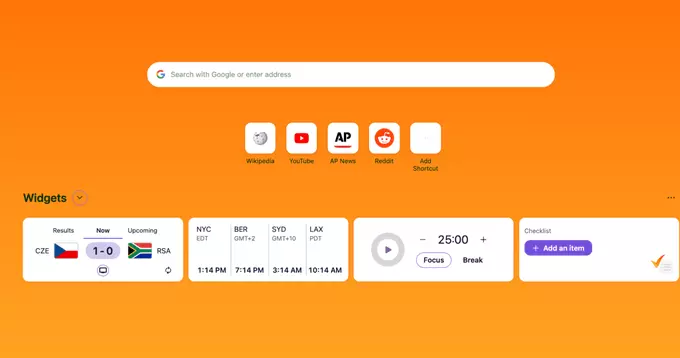
If you’re like me, you probably open your browser dozens of times a day. And each time, you’re hit with distractions — tabs, news, social media. That’s why I was excited to try Firefox’s new home page widgets. These simple tools are helping me focus, stay organized, and get more done without feeling overwhelmed.
Firefox recently redesigned its new tab page. Instead of just showing a search bar and top sites, you can now add productivity widgets. These are small, customizable blocks that show useful information at a glance.
Before these widgets, my new tab page was a blank slate — or worse, a news feed. Now, I see only what matters. For example, my Recent Highlights widget reminds me of tasks I started earlier. I don’t get sidetracked by random articles or trending topics.
Here’s a quick example: I’m writing a report. I open a new tab, and my widget shows the research page I had open yesterday. I click it and keep working. No distractions.
Chrome and Edge have similar features, but Firefox’s widgets are simpler and more private. No ads, no tracking. You control what you see. Plus, they load fast — even on slow connections.
For anyone who struggles with online distractions, these widgets are a game-changer. They turn your browser into a focus tool, not a distraction machine.
Firefox’s new home page widgets are small but powerful. They help me focus by showing only what I need, when I need it. If you want a cleaner, more productive browsing experience, try them today. You might be surprised how much more you get done.









Comment