Alerts

-
4 minutes, 48 seconds
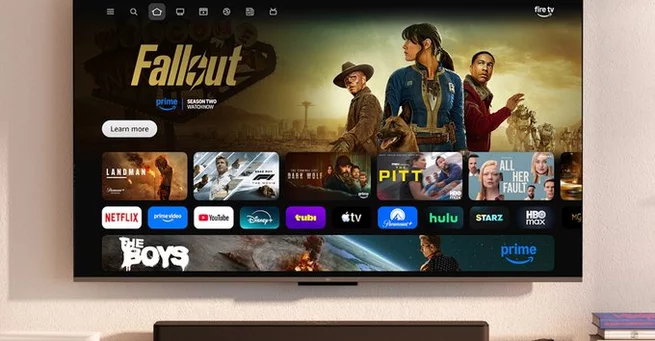
Amazon has finally overhauled its Fire TV OS, addressing long-standing complaints about navigation and responsiveness. The updated interface aims to compete with Google TV, Roku, and Apple TV by offering a cleaner, more intuitive design. Users can expect smoother browsing, smarter content aggregation, and greater flexibility in managing apps. For those frustrated with the older layout, this revamp promises a fresh, user-friendly experience that makes finding and watching shows faster and more enjoyable.
The redesigned Fire TV OS features top-level tabs for Home, Search, Movies, TV Shows, Sports, News, and Live content. This structure separates browsing by type rather than lumping all apps together, making it easier to find exactly what you want. Rounded-corner tiles replace the old rectangular blocks, creating a visually appealing interface that’s easier to navigate. The experience now feels more organized and less cluttered, providing a modernized look similar to other popular streaming platforms.
One of the biggest upgrades is the ability to pin up to 20 apps on the homepage, compared to just six in the old layout. Users can reorder apps to place their favorites first, improving accessibility and reducing frustration. While sponsored content and recommendations remain visible, the new arrangement balances promotion with usability, ensuring your top apps remain front and center. This enhancement makes Fire TV OS more practical for users with multiple streaming subscriptions.
Sports fans will appreciate the dedicated Sports tab, which aggregates live games across all your subscribed services. You no longer need to hunt through different apps to catch a game—Fire TV OS surfaces live events and suggested matches immediately. This feature highlights Amazon’s push to make the platform not just for on-demand content but also a go-to hub for live sports entertainment.
The updated OS also introduces more intelligent content suggestions. Instead of simply displaying app-specific recommendations, Fire TV OS now curates titles from across all subscriptions. Whether you’re browsing movies, TV shows, or live events, the system prioritizes relevance and variety. This shift aligns Amazon’s platform closer to competitors like Google TV, where content discovery feels seamless and personalized.
The aesthetic improvements extend beyond layout. Rounded corners, smoother transitions, and clearer typography make the interface feel polished and modern. The redesign demonstrates Amazon’s commitment to enhancing both form and function, giving users a visually appealing and intuitive experience that matches the capabilities of its high-end TVs like the Panasonic Z95B.
Amazon hasn’t provided a precise release date for the new Fire TV OS, but demos at CES 2026 suggest it’s coming soon. Early impressions indicate a significant leap forward for the platform, particularly for users frustrated with the old interface. With smarter navigation, improved app management, and personalized recommendations, the revamp positions Fire TV OS as a stronger competitor in the crowded streaming device market.
Amazon’s Fire TV OS redesign brings a much-needed breath of fresh air to its streaming platform. By focusing on usability, personalization, and visual appeal, Amazon is turning one of its weaker offerings into a compelling alternative for entertainment enthusiasts. The update could finally put Fire TV on equal footing with Google TV, Roku, and Apple TV, making it a platform worth revisiting.










Comment