Alerts

-
3 minutes, 8 seconds
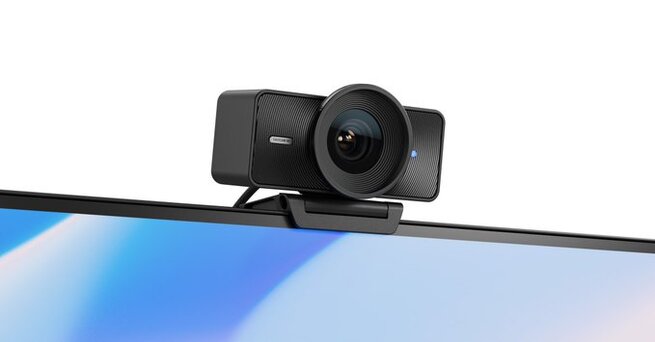
Elgato Facecam 4K Makes Professional Webcam Features Affordable
Looking for a professional webcam that supports 4K at 60fps without breaking the bank? Elgato Facecam 4K delivers high-end performance with unique lens filter support, all for $199.99. It’s a more accessible option than the $299.99 Facecam Pro while still offering impressive video quality and customization. Whether you're live streaming, recording YouTube videos, or joining video conferences, the Facecam 4K allows you to achieve DSLR-like results by adding cinematic filters and controlling camera settings with Elgato’s Camera Hub software.
Pro-Level Lens Filters on a Webcam? Elgato Makes It Possible
One of the standout features of the Elgato Facecam 4K is its compatibility with 49mm lens filters. This is a first for webcams, offering creators access to effects typically reserved for DSLRs. You can attach diffusion filters for a soft look or CPL filters to reduce glare from glasses—Elgato even includes a free CPL filter when you buy from its store. Add third-party black mist or star filters to give your content a distinctive visual style. There’s also a privacy cap that mimics DSLR lens covers, adding both security and a professional feel.
Hardware That Rivals Studio Gear
Elgato equips the Facecam 4K with Sony’s advanced Starvis 2 CMOS sensor and a fixed-focus Elgato prime lens with an f/4.0 aperture. While it doesn’t outperform the Facecam Pro in low-light situations due to its smaller aperture, it still captures 4K video at 60fps with crystal clarity. You can also opt for HDR at 30fps for more dynamic visuals. It connects via USB-C, weighs just 112 grams, and includes a 1/4-inch thread for flexible mounting setups—ideal for streamers and professionals alike.
Streamlined Controls with Elgato’s Camera Hub
Controlling your webcam has never been easier. The Facecam 4K integrates seamlessly with Elgato’s Camera Hub software, where you can manually fine-tune ISO, shutter speed, exposure, zoom, tilt, and pan settings. All configurations can be saved directly to the webcam, eliminating the need for constant reconfiguration. Plus, if you're using an Nvidia RTX GPU, you’ll enjoy enhanced background blur with AI-driven depth-of-field effects, giving your video a high-end, DSLR-quality appearance straight out of the box.










Comment