Alerts

-
2 minutes, 57 seconds
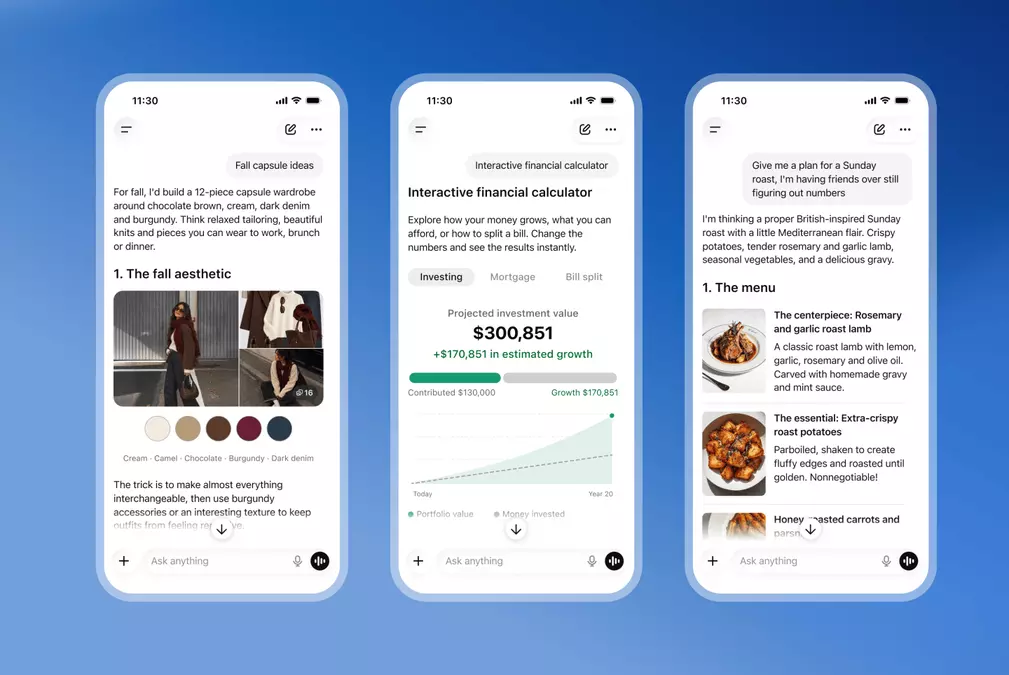
OpenAI is launching Intelligent UI, a new feature that lets ChatGPT answer questions with interactive visuals. Rather than relying on text alone, the chatbot can combine a written response with elements such as diagrams, charts, forms and tappable buttons.
The update is rolling out to all users alongside GPT-6. It brings interactive responses directly into the conversation, giving ChatGPT more ways to present information and let people engage with it. Depending on the response, users may encounter a chart alongside an explanation, a diagram that helps illustrate an answer, or a form or button they can tap.
Intelligent UI is therefore not just a change to how ChatGPT phrases its answers: it expands the kinds of content that can appear within them. Text remains part of the response, but it can now be paired with visual and interactive elements in the same conversation. OpenAI describes the feature as a way for the chatbot to answer questions using these combined formats.
With the rollout, people using ChatGPT can encounter responses that bring together written explanations and interactive visuals, rather than receiving text by itself.
OpenAI says the Intelligent UI update is rolling out to all ChatGPT users alongside GPT-6. The launch pairs the new model with a change in how the chatbot can present answers: instead of relying only on text, ChatGPT can combine a written response with interactive visuals directly in a conversation.
Those responses may include diagrams, charts, forms, tappable buttons, and other elements. The feature is intended to let ChatGPT deliver information in formats that users can interact with, rather than limiting every answer to a block of prose. It is part of the wider GPT-6 rollout, so the update is arriving alongside the model for users across ChatGPT.
OpenAI describes the change as a new Intelligent UI feature, not simply a visual refresh. Its responses can bring together text and interactive components within the same answer. As the rollout reaches users, conversations with ChatGPT can therefore include these visuals alongside the chatbot’s written explanations.
In a blog post explaining the change, OpenAI says it trained ChatGPT to respond with interactive visuals as well as text. The update lets the chatbot combine its written response with diagrams, charts, forms, tappable buttons and more. OpenAI describes Intelligent UI as a way for answers to include interactive elements directly in a conversation.
With Intelligent UI, interactive responses appear directly inside the ChatGPT conversation, rather than as a separate experience. ChatGPT can combine its usual text response with visuals and controls, so a reply may include both an explanation and an interactive element in the same conversation.
Those elements can include diagrams, charts, forms and tappable buttons. The result is a response that brings text and interactive visuals together: the chatbot can answer in words while also presenting a visual or control as part of that answer. The feature allows ChatGPT to respond to questions with interactive visuals, integrated into the conversation itself.
This changes how a response can be presented, without separating the interactive material from the chatbot’s text. For example, a reply may pair text with a diagram or chart, or include a form or tappable button alongside the written response. Intelligent UI therefore makes these interactive elements part of the conversation, combining them with ChatGPT’s text rather than presenting them as an unrelated addition.






Comment